03: Basic Terms
Workstream
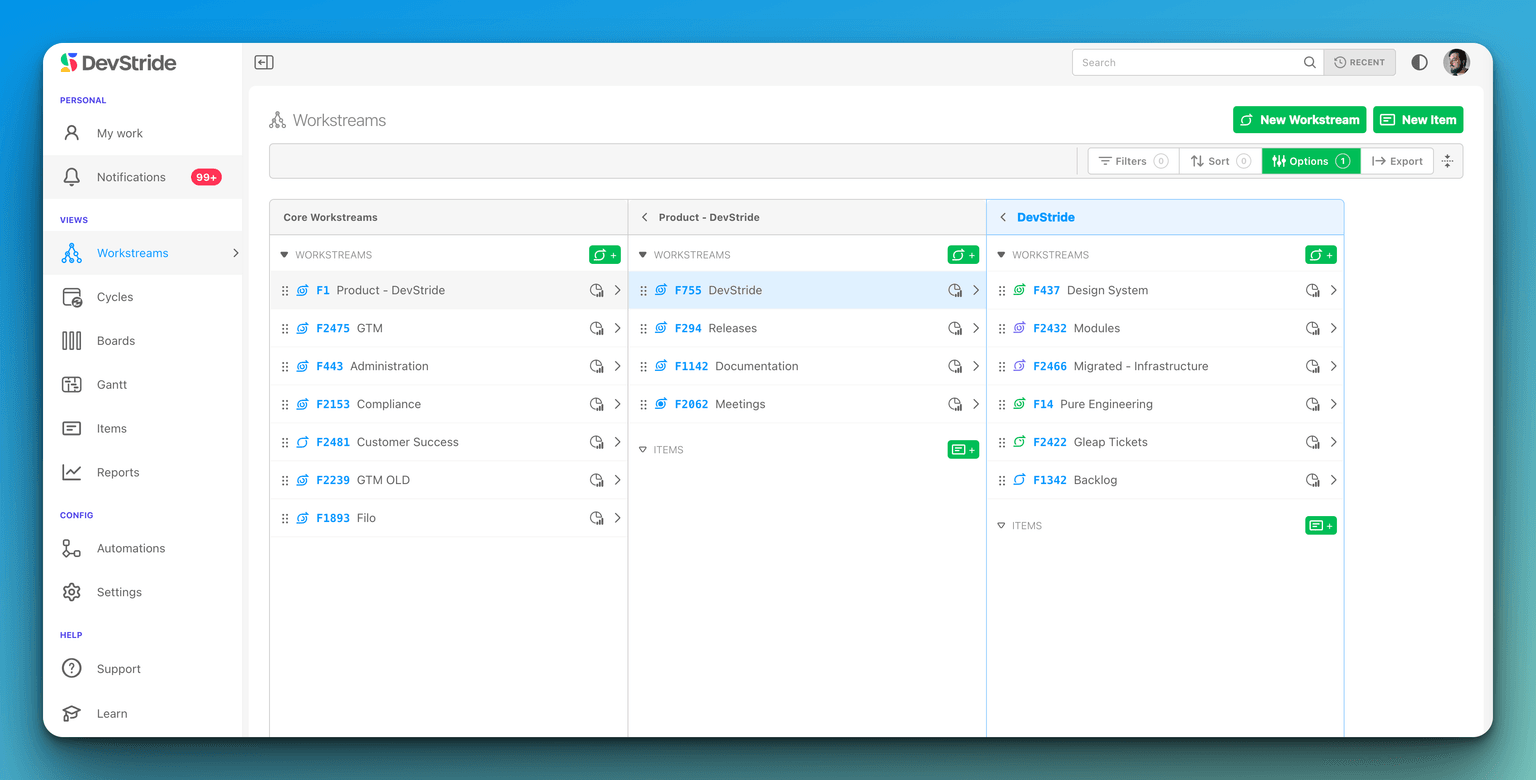
The Map Value module is a portfolio map view comprised of workstreams. A Workstream represents a delivery of value - it is "the what" that needs to be done in an organization.
DevStride allows you to organize workstreams in the most meaningful way for your business. Inside the map, each top-level workstream is called a core workstream.
A Core workstream represents initiatives, products, functional areas, or any top-level division of work that best reflects your organization's value delivery.
Workstreams can be nested, allowing you to subdivide work into more refined streams within a tree structure. You can create as many nested workstreams as you like. Sub-workstreams roll up to the core workstreams, giving visibility at any level up or down the map.
Drag and drop workstreams to instantly update your organization’s workflow according to your operational needs.
Work Item
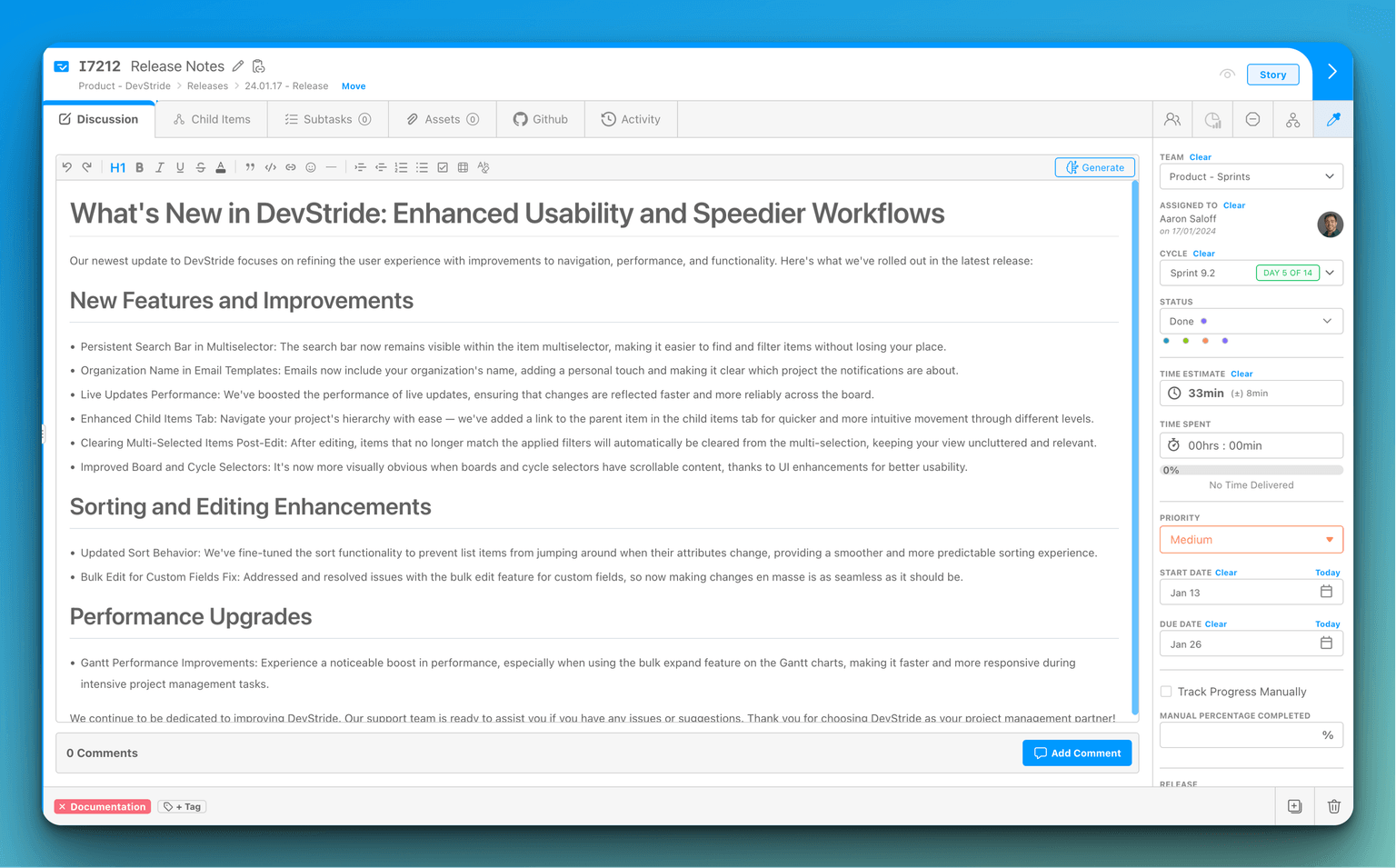
An item is an assignable unit of work housed in a workstream. Each item contains a description, comments, assets, activity, and sophisticated tools to assign, estimate, and track work.
To add an item to the workstream from the Map, Plan, or Work modules, click the green Add Item button in the top right corner of the screen. Once you've assigned the Item Title, begin entering information in the workspace.
Items can also be added from other locations in DevStride.
Workspace
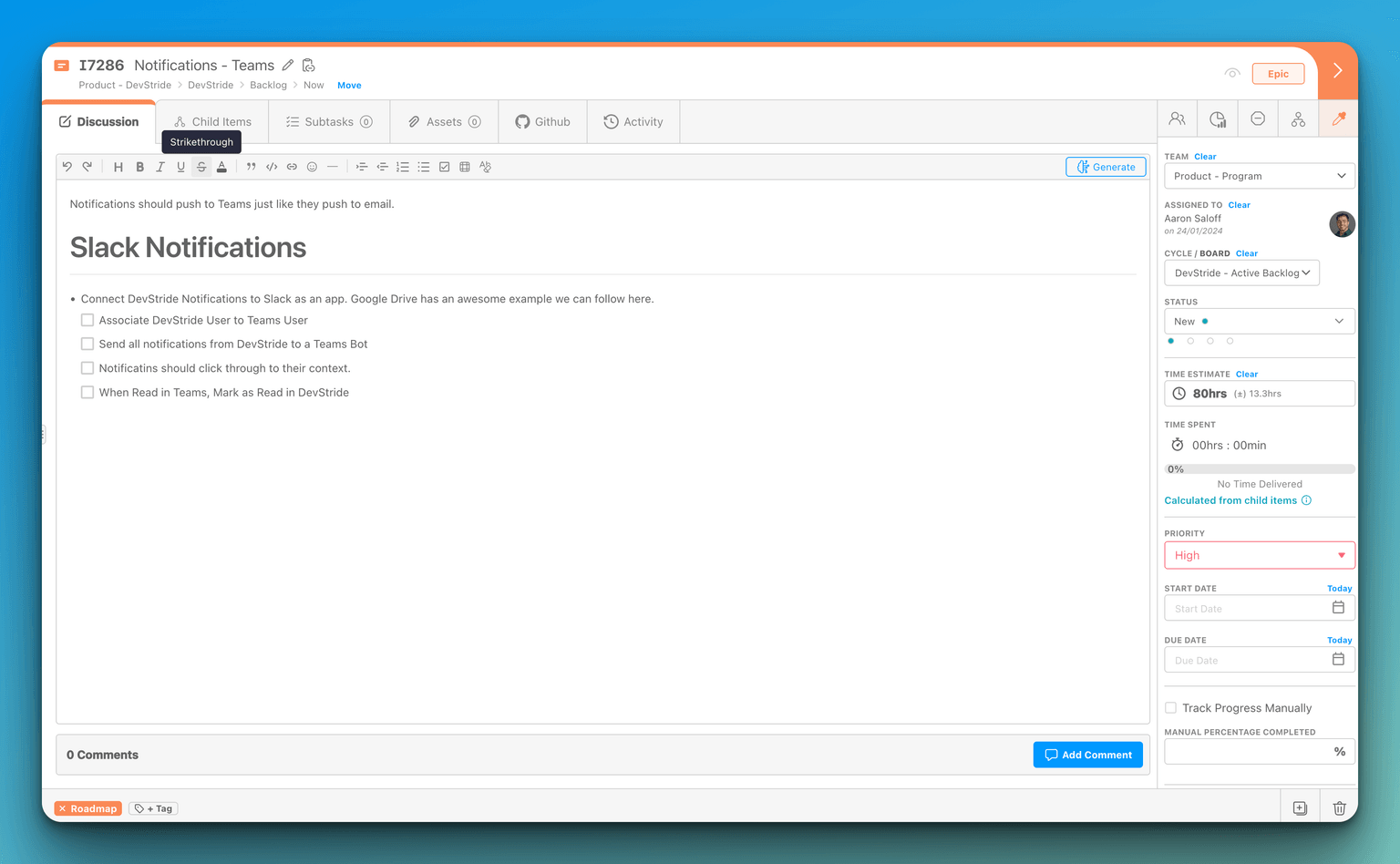
Every item and every workstream contains a Workspace. A Workspace is where a user can populate and manage all the information and activity for a work item. The workspace offers a variety of information and functionality, such as:
- Title and Number
- Rich Text Description
- Comments
- Uploaded and Linked assets
- Code-hosting integration platforms
- Team and User assignment
- Priority level
- Cycle and Status
- Time and Effort Point Estimates
- Custom Fields
- Tags
Cycle
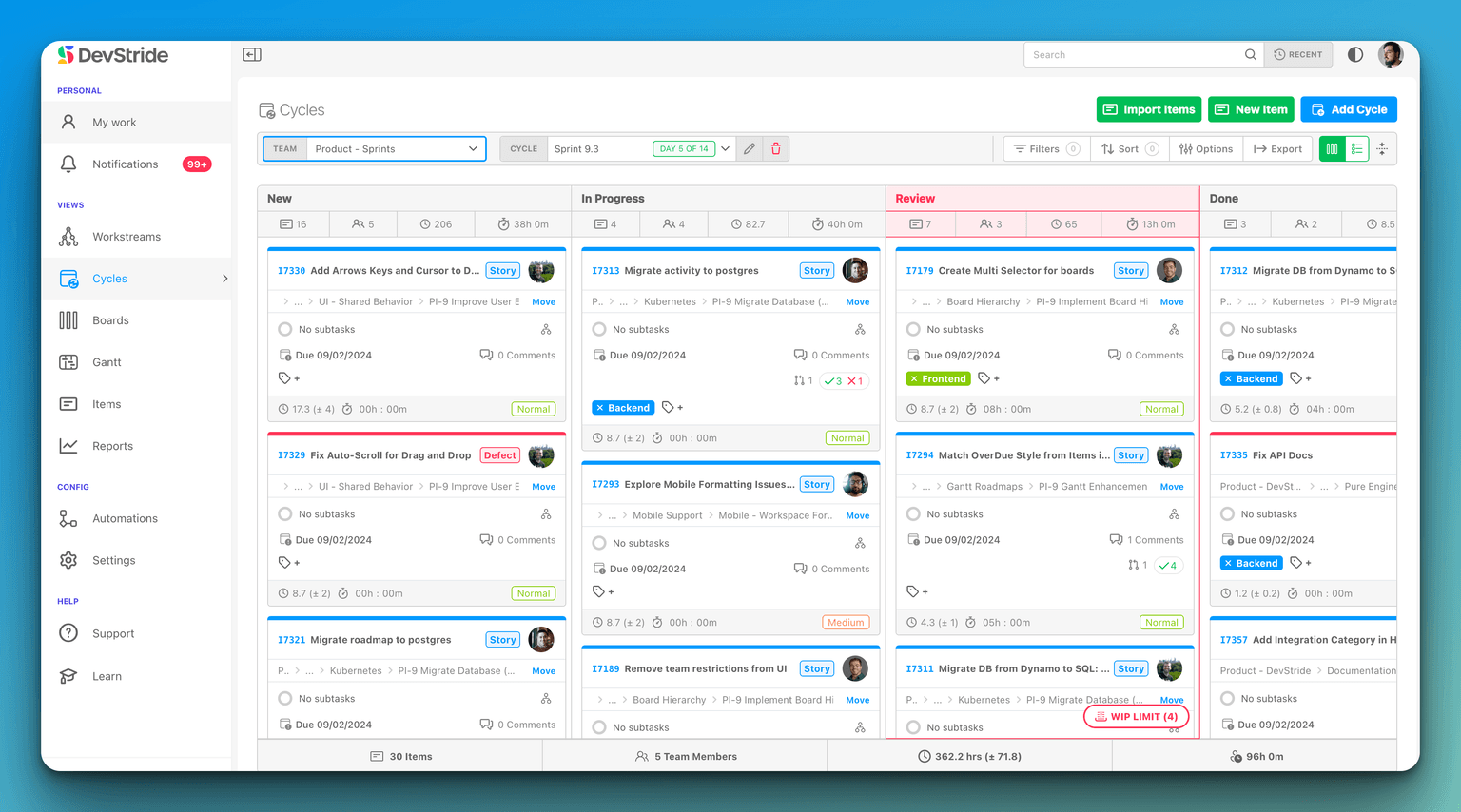
A cycle enables users to plan and track work within a given period. A cycle is a repeating window of capacity planning, commitment, and execution. Planning and working in cycles allows a team to manage and project performance over time.
Cycles are created in Settings under cadences. Cycles are then assigned in the Plan Delivery Module. Agile organizations practicing Scrum frequently plan in a two-week "sprint." In contrast, others plan quarterly, monthly, or weekly. How you define a cycle's length is up to you and your team!
You can assign items to current or future cycles for completion.
Cycles are not mandatory. If your team prefers continuous flow, you can work entirely on perpetual (ongoing) boards and skip cycle-based planning altogether.
Board
In DevStride, users can view and move work items within a KanBan board in the Plan Delivery module. Boards can be set up as perpetual (ongoing) or cycle-based. Drag item cards between lanes as work progresses.
Users can apply filters for a swift and practical segmentation of work items in the Status view, Table view or 2D view.
Gantt
A Gantt chart is the timeline mechanism behind the Track Progress module. It plots your items along a calendar by their start and due dates, so you can see schedules, sequencing, and overlaps at a glance.
On the Gantt you can manage dependencies between items, set milestones for key dates, and adjust schedules directly on the timeline. It turns the same work you organize in Map Value and Plan Delivery into a time-based view for planning and tracking delivery. Gantt chart basics
More Terms
The concepts above are the core building blocks. Below is a broader glossary of terms you'll encounter throughout DevStride, grouped by where they show up. Each links to a deeper guide where one exists.
Where you work (modules)
These are the main areas in the left navigation.
- Automate Workflows — Where you build automations that react to events and take actions. Setting up automations
- Manage Items — A cross-project table of every item, with filtering, sorting, and saved views. Manage Items
- Map Value — The portfolio view where you organize workstreams and items into a hierarchy. Using the Map
- Measure Performance — The analytics area with reports on progress, velocity, cycle time, and more. Measure Performance
- My Work — Your personal dashboard of items assigned to you. My Work
- Plan Delivery — Where you manage execution on boards and folders, moving work through statuses. Plan Delivery: Boards
- Track Progress — The timeline (Gantt) view for scheduling items against start and due dates. Track Progress: Gantts
Structuring work
- Custom Field — A field you add to items to capture domain-specific data (text, date, number, select, and more). Custom fields
- Dependency — An item the current item is blocked by: a prerequisite that must be completed first. Dependencies drive the dependency graph and Gantt scheduling. Dependency graph
- Dependent — The mirror of a dependency: an item the current item blocks — work that's waiting on this item to finish. Manage and edit dependencies
- Dual Hierarchy — DevStride organizes the same work two ways at once: the workstream hierarchy in Map Value captures the what (the value to deliver, as nested core and sub-workstreams), while the folder-and-board hierarchy in Plan Delivery captures the who and when (the working groups executing it). An item lives in a workstream for portfolio and value context and is also placed on a board within a folder for delivery — so you can navigate and roll up the same work by either value or delivery. Working-group folders
- Folder — A container in Plan Delivery for organizing boards and cycles; boards and folders inherit permissions from their parent. Working-group folders
- Item Type — A classification for items (for example Epic, Story, or Task) that defines how they nest and which fields they carry. Item Types
- Priority — A configurable ranking that indicates an item's relative importance. Priority levels
- Related to — A non-directional link between two items (shown as Related in the Relationships dialog): a peer or reference association that, unlike a dependency, doesn't block either item or affect scheduling. Manage and edit dependencies
- Subtask / Child Item — A smaller unit of work nested under a parent item, with its own status, assignee, and estimates. Item hierarchy
- Tag — A user-defined label (or a reserved tag such as Blocked) applied to items for categorization and filtering. Tags
Workflow and Boards
- Automation / Trigger — A rule that watches for a trigger event (such as a status change) and runs actions automatically. Setting up automations
- Cadence — A repeating interval (sprint, month, quarter) defined in Settings, from which cycles are generated. Cadences
- Cycle Board — A board bound to a cadence with start and end dates; its items inherit the cycle's dates. Cycle boards
- Perpetual Board — An ongoing board with no time box, suited to continuous flows like backlogs or bug queues. Perpetual boards
- Status — A column on a board representing a stage of work (for example New, In Progress, or Done). Items move between statuses as work progresses. Statuses & WIP limiters
- Status Collection — A named set of statuses that defines the workflow available to a board. Statuses & WIP limiters
Finding & organizing
- Filter — A way to narrow items by attributes such as status, team, priority, or custom fields. Finding & filtering items
- View (Stored View) — A saved combination of filters, sort, and columns; can be kept private, shared, or published. Creating & sharing views
People & access
- Assignee — The member responsible for an item (the "Assigned To" field). Creating work items
- Role — An organization-wide set of permissions (such as Owner, Admin, or Member) that controls what a person can do across DevStride. Roles & permissions
- Sharing & Access — Per-object permission grants (view, comment, edit, own) on a specific item, board, or folder. Sharing & access
- Team — A group of members who work together; items and boards can be assigned to a team. Setting up users & teams
- Watcher — Someone following an item to stay informed. Watchers are notified (in-app, email, or Slack, per their notification settings) when the item changes — status, assignment, comments, dates, relationships, and more. Anyone who can edit the item can add or remove watchers. Overview of notification options
Estimation & scheduling
- Link Mode — A Gantt option that cascades due-date changes down a dependency chain to keep schedules aligned. Link mode
- Milestone — A diamond marker on a Gantt chart representing a key date or delivery checkpoint. Add to a Gantt
- Point Estimate — A relative measure of effort for an item (for example story points), used in capacity planning and velocity. Effort points & time estimation
- Time Estimate — An estimated duration to complete an item, distinct from time actually spent. Effort points & time estimation
Reporting metrics
- Burn Up / Burn Down — Forecast charts tracking completed work (burn up) or remaining work (burn down) against a target. Burn up · Burn down
- Churn — Work that was added but not completed, or reopened and reworked — a signal of scope creep or quality issues. What is Churn?
- Current Progress — A snapshot of how much work is complete versus remaining at a point in time. What is Current Progress?
- Cycle Time — How long work takes from start to completion; used to spot bottlenecks. What is Cycle Time?
- Throughput — How many items are completed in a given period. What is Throughput?
- Velocity — How much work a team completes per cycle, used to forecast future capacity. What is Velocity?
Intake & integration
- API Key — A personal credential for programmatic access to DevStride via its API or integrations. API keys
- Item Request Form — An internal or public form that collects structured input and creates items automatically. Item request forms
- MCP Server — DevStride's Model Context Protocol server, which lets AI assistants connect to DevStride and act on your behalf. Connect AI & MCP
- Published List — A read-only, externally shareable view of items accessible without a DevStride login. Published lists
- Template — A reusable workstream and item structure you export and re-import to recreate a hierarchy quickly. Import templates
General project management terms
These are common industry concepts, not unique to DevStride, that show up throughout the product.
- T-shirt Sizing — A lightweight estimation technique that sizes work using relative buckets (XS, S, M, L, XL) rather than exact hours or points. It's handy for quick, early sizing before detailed estimates exist; in DevStride you can represent these rough sizes with a point estimate scale or a custom field.
- WIP Limiter — A "work in progress" limit: a cap on how many items may sit in a given status (board column) at once. WIP limits are a core Kanban practice — they expose bottlenecks and push teams to finish work before starting more. In DevStride you set a limit on a status, and the board warns you when that stage goes over it. Boards & WIP limiters