Item Types
Introduction
In the realm of portfolio management, the effective use of Item Types in DevStride can be a game-changer. Item Types revolutionize project management by introducing a level of categorization and specificity that transforms how tasks and resources are organized, monitored, and executed.
Understanding and utilizing these types not only brings organization and clarity but also significantly boosts efficiency and team coordination.
Defining Item Types
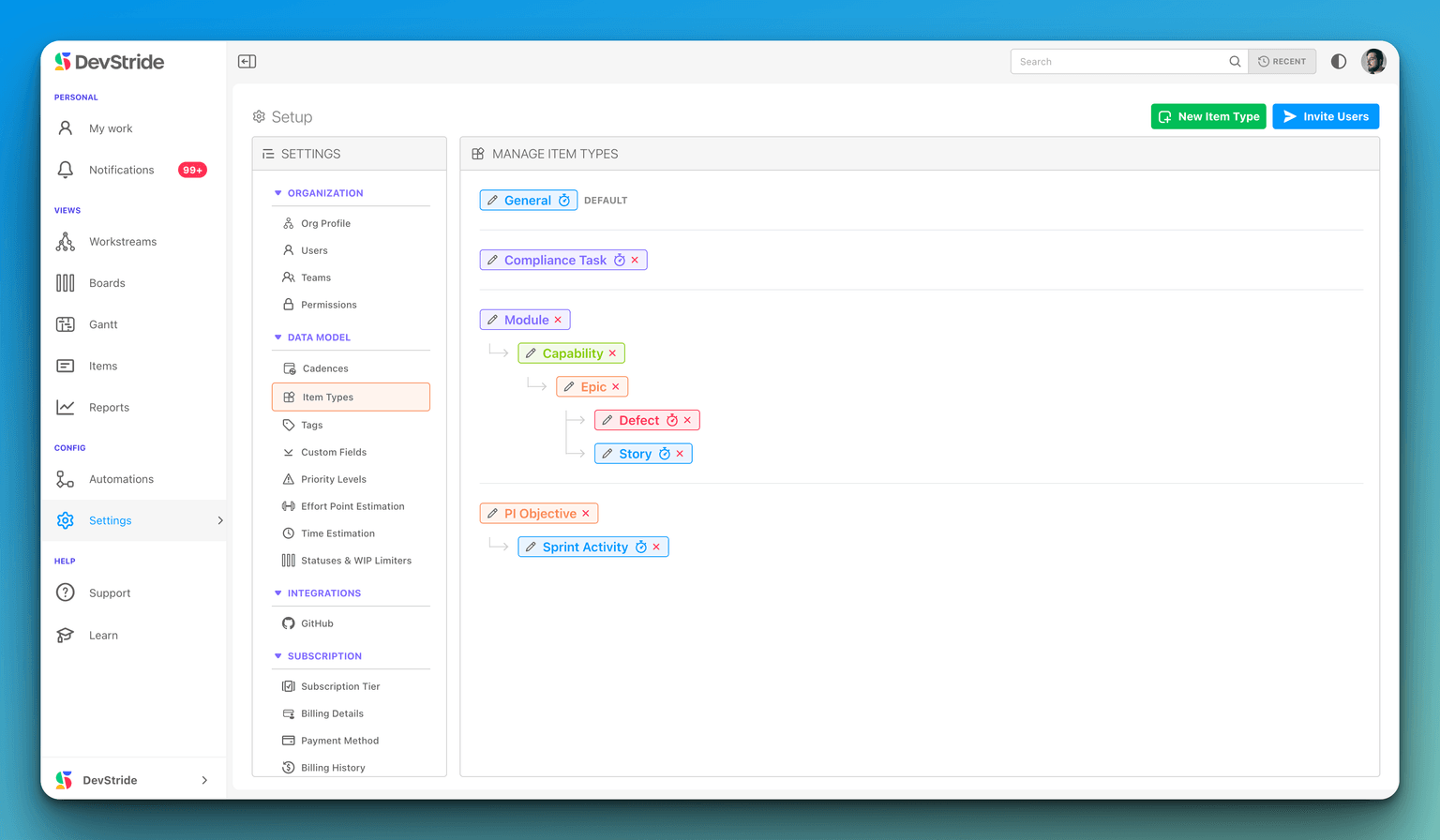
Item Types in DevStride are a fundamental feature that allows users to formally declare an item as a specific entity within an agile hierarchy, such as a capability, an epic, or a user story. This feature is instrumental in managing a formal product hierarchy, providing a structured approach to project organization. By using Item Types, project managers can create a clear and defined hierarchy, ranging from broader categories like Solutions and Modules to more specific ones like Features, Epics, Stories, and Issues.
A significant advantage of this system is the ability to create child items directly under a parent item without the need for wrapping them in a workstream. This capability enhances the flexibility and efficiency of project management, allowing for a more intuitive and direct way to manage and navigate the complexities of a project.
Changing an item's type
When an item has children, the item-type control explains that their types may not be allowed under a different item type. To change the type through the app, first move those children elsewhere in the hierarchy. Archived children also count: move them, or delete them only if you no longer need them. Archiving children alone does not remove the restriction.
For a bulk item-type change, the selected items must share a parent type and have no children.
Benefits
Consistent Organization: With DevStride's new feature, once you define your agile hierarchy in Settings > Item Types, the software will consistently enforce this hierarchy across your projects. This means there is no need for manual intervention or ongoing management to maintain this structure, ensuring a uniform approach to organizing project elements.
Drag Anywhere: A significant enhancement in DevStride is the Drag Anywhere capability. Now, when you move an item anywhere within the project map, all data fields are preserved. This improvement is because data fields are now keyed to the item's type, rather than being tied to the item's core workstream, making the process more intuitive and less prone to data loss or inconsistency.
Simpler Map: The introduction of a Simpler Map in DevStride streamlines project management. You can directly create items, such as Themes, which then house Epics, Stories, etc., within them. While workstreams remain a powerful tool for organizing work that doesn't fit neatly into the agile hierarchy, tasks that belong in your agile flow no longer need to utilize workstreams, simplifying the overall project structure.
Better Metrics: DevStride's new capabilities also extend to Better Metrics. The system can now automatically generate roll-up metrics based on the amount of work completed at different levels of the hierarchy. For example, by right-clicking on a Theme, you can instantly view metrics such as the percentage of Epics, Stories, and Issues completed within that theme, providing a clear and comprehensive overview of your project's progress.