Boards and WIP Limiters
Adding Value to Board Management - Setting WIP Limiters
WIP stands for Work in Progress or Work in Process. WIP limiters create a way for a team to limit how much work can be accepted into a work queue (board) at a time.
WIP limits are a powerful way to use DevStride for managing work, for preventing overload, and—critically—for avoiding unnecessary project delays.
When a set of work exceeds the limits put in place—the entire column turns red, alerting the team to the item overage. The best practice is to adjust the number of items you are managing in a particular stage.
Note: WIP limiters can be overridden in the case that an item has to be added over an above the limit, for whatever reason, such as an unforeseen event.
Team can choose to ignore a WIP limit warning. WIP limiters can be more strictly enforced through the use of automations.
The more "things" you put into a work queue, the slower the queue gets.
Though this statement seems obvious, sometimes teams forget that the very fact that an item exists causes extra time—even if that item is a small one.
Each additional work item - even if small - causes additional collateral effort in several different ways, just like big items do. You have to include both small items and big items in assignments, meetings, reviews, etc. Cognitive attention increases across the load of all the things you are managing and time necessarily increases against every item in that queue - increasing the overall time.
Many studies have shown that the actual work inside of several separate work queues even with one item each goes faster collectively than 1 queue of several items. However, many teams also find managing multiple queues unsatisfactory.
The answer? WIP Limiters.
In general, a limit exists for how many things a given team can effectively manage at once. As a team works through each workflow cycle, this "number of items" can get refined over time.
Teams also tend to have a general number of items that they can manage based on what stage a group of items is in. Some states—such as "review"—might be able to handle more or few items of load than other states - such as "in progress."
With this in mind, in DevStride, we allow each status in the collection can have its own WIP limit. This means you can indicate how much Work in Progress (WIP) can exist in each state so that your teams overall workflows can be managed accordingly.
Setting up WIP Limiters in DevStride
Step 1: Configure WIP Limiters for Each State
In the Manage Statuses and WIP Limiters pane click into the status of the collection for which you would like to create WIP limiters (1). Enter or select the number of items you would like to use as your WIP limit for the stage (2).
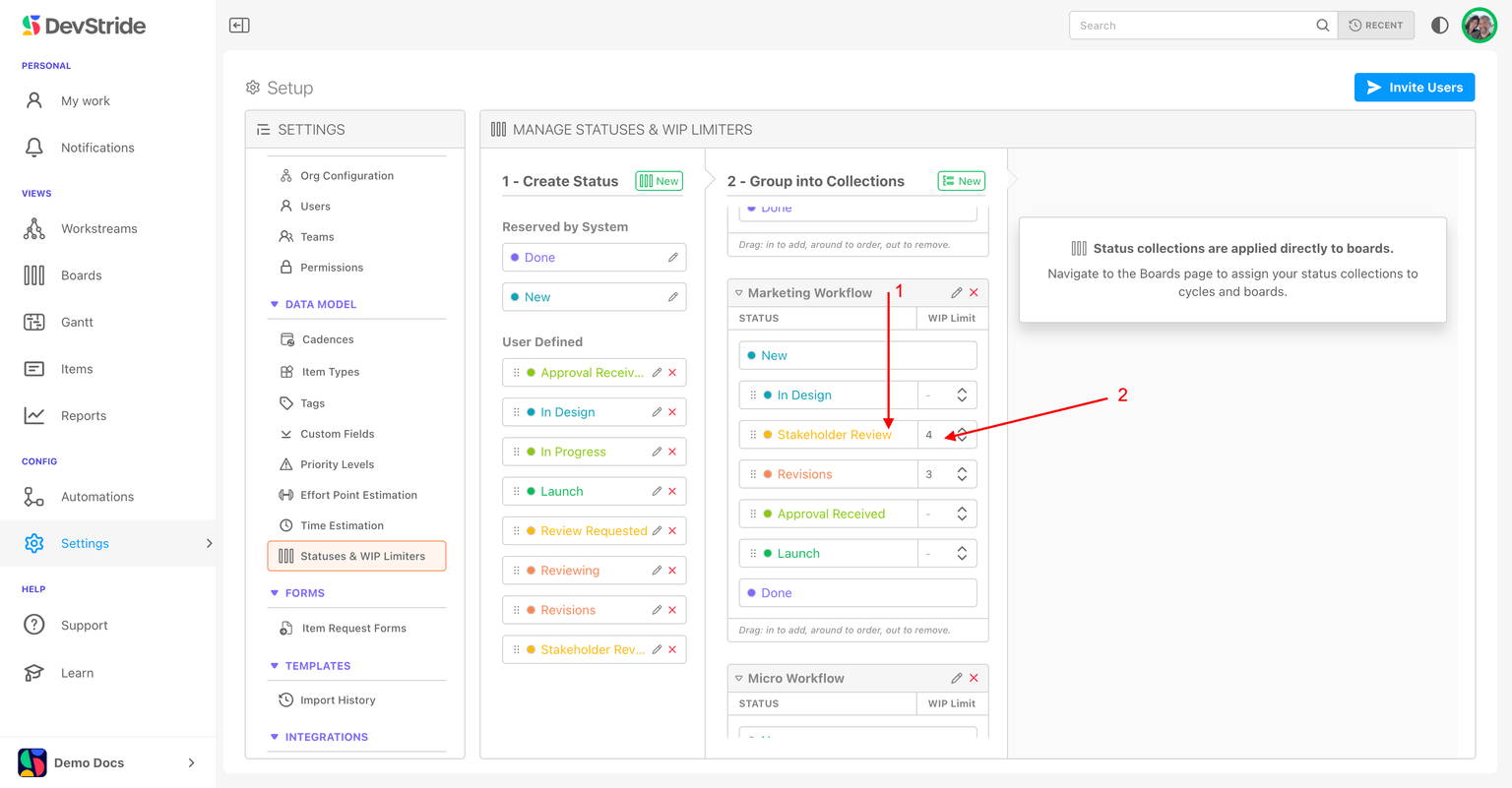
Step 2: Repeat for each status that requires a limiter based on your team’s capacity.
Note that you do not have to enter WIP limiters for all of the statuses in a collection.
Track and Move Work with Board Views
Track, reorder, and move work across the Status, Table, and 2D board views, view parent/child hierarchy in the Table view, and jump straight to a board from any item.
Board & Folder Permissions
Control who can view, edit, and manage your boards and folders with user, team, and organization-level permissions.