01: Setting the Stage: How Predictability becomes Reality in DevStride
Planned Value to Predictable Delivery
About DevStride 🚀
DevStride is built to help organizations that:
- Manage projects, from standard and repeatable work to complex, high-stakes delivery initiatives
- Coordinate work across multiple teams or departments
- Need visibility to reliably hit critical milestones
Whether you're managing a single project or collaborating across multiple teams and tools, DevStride helps you eliminate chaos, align on priorities, and deliver results with confidence.
DevStride elevates predictability across your delivery organization for positive, repeatable results.
Innovative features like portfolio roadmaps, automation, and nested Kanbans align teams, while realtime analytics provide actionable insight into progress and performance.
Read on to find out how DevStride for your organization. Discover efficiency and predictability—at scale.
Understand the Core Distinction: Value delivery planning and team execution
DevStride solves what can otherwise be a significant project and portfolio management challenge: the idea of value delivery (what’s being accomplished or delivered) vs. team execution (who’s working on what and when), which may represent several moving parts in the overall portfolio of work.
Mistaking one for the other leads to misaligned boards, poor reporting, and eventually rework.
DevStride provides dual lenses through Planning Value in Workstreams and Planning Delivery in Boards:
Value Delivery View (Workstreams): What are we trying to accomplish as a business?
Execution View (Boards): What are our various working groups doing to accomplish it and when?
Real-World Use Cases:
Here are a couple of real-world examples:
DevOps(s) resources has a board that tracks all their web development efforts, but they may be creating features from 10 different workstreams on the portfolio (Map Value) map.
A Sales Enablement Team might have a board of tasks and deliverables (playbooks, campaigns, onboarding docs) that belong to different strategic initiatives in Map Value.
How this works in DevStride
Here's how DevStride creates predictable success by linking value mapping to execution through 4 key modules:
- Map Value
- Plan Delivery
- Track progress
- Measure performance
1. Define Your Value Delivery
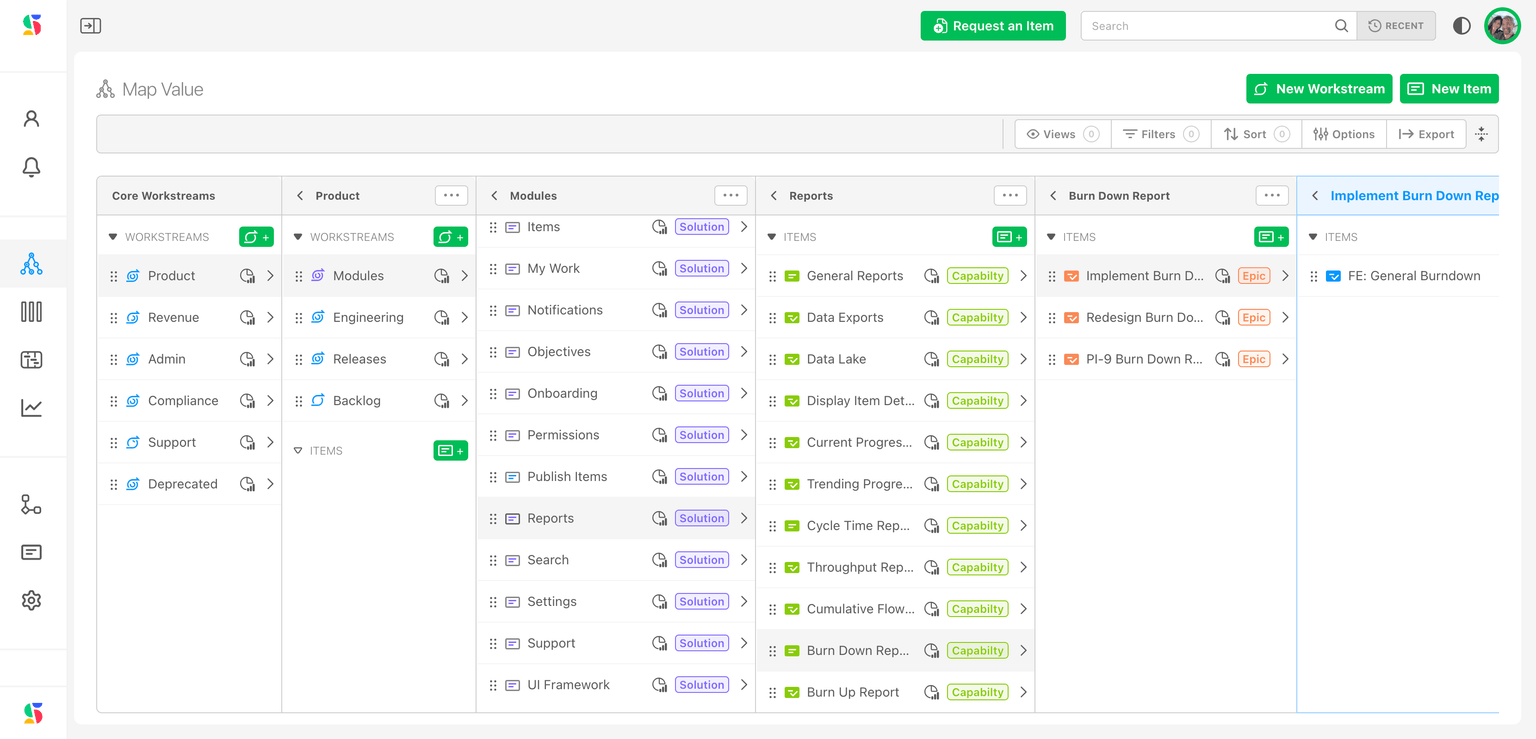
When creating a workstream, name it based on the business value you plan to deliver (e.g., “Customer Portal”, “Q3 Product Launch”, “Sales Acceleration”).
Within the workstream, create items (e,g., Intiative, Objectives, Tasks or Epics, Features, Stories) that represent outcomes you plan to deliver.
Structure these hierarchically using DevStride’s item types.
Break down work items from bigger units of work to smaller.
For example, a development group's item type hierarchy might look like this:
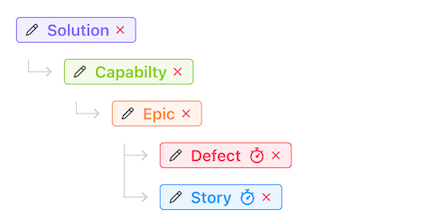
Goal: Using a map of value and an item hierarchy helps you to decompose the work/value to be delivered from the big things - like initiatives, all the way down to the small things, like tasks. This is your planned value view, like a product owner or business leader would view it - a delivery of value.
Instead of creating workstreams named for teams, such as “Frontend Team” or “QA Team,” capture what the teams are building, not who is building it.
You will assign work to teams later in boards.
2. Organize Folders and Define Team Execution in Plan Delivery
Create folders (1) named for how teams operate as working groups performing work (e.g., "QA Team", "Web Product x Engineering Team", "Customer Ops").
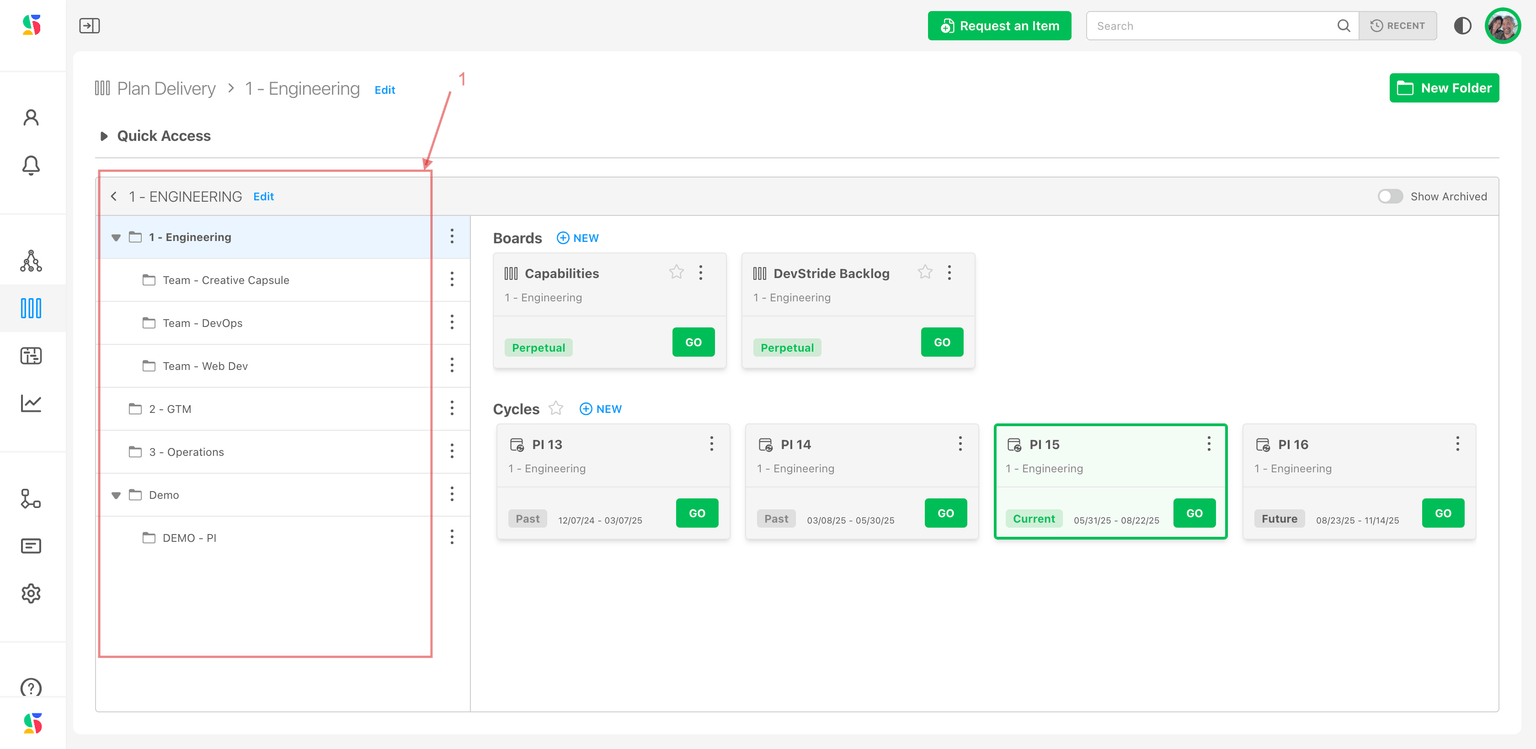
Inside each folder, create:
- Perpetual Boards (for ongoing work)
- Cycle Boards (for sprints or deadlines) with an assigned cadence/timebox
as needed (2):
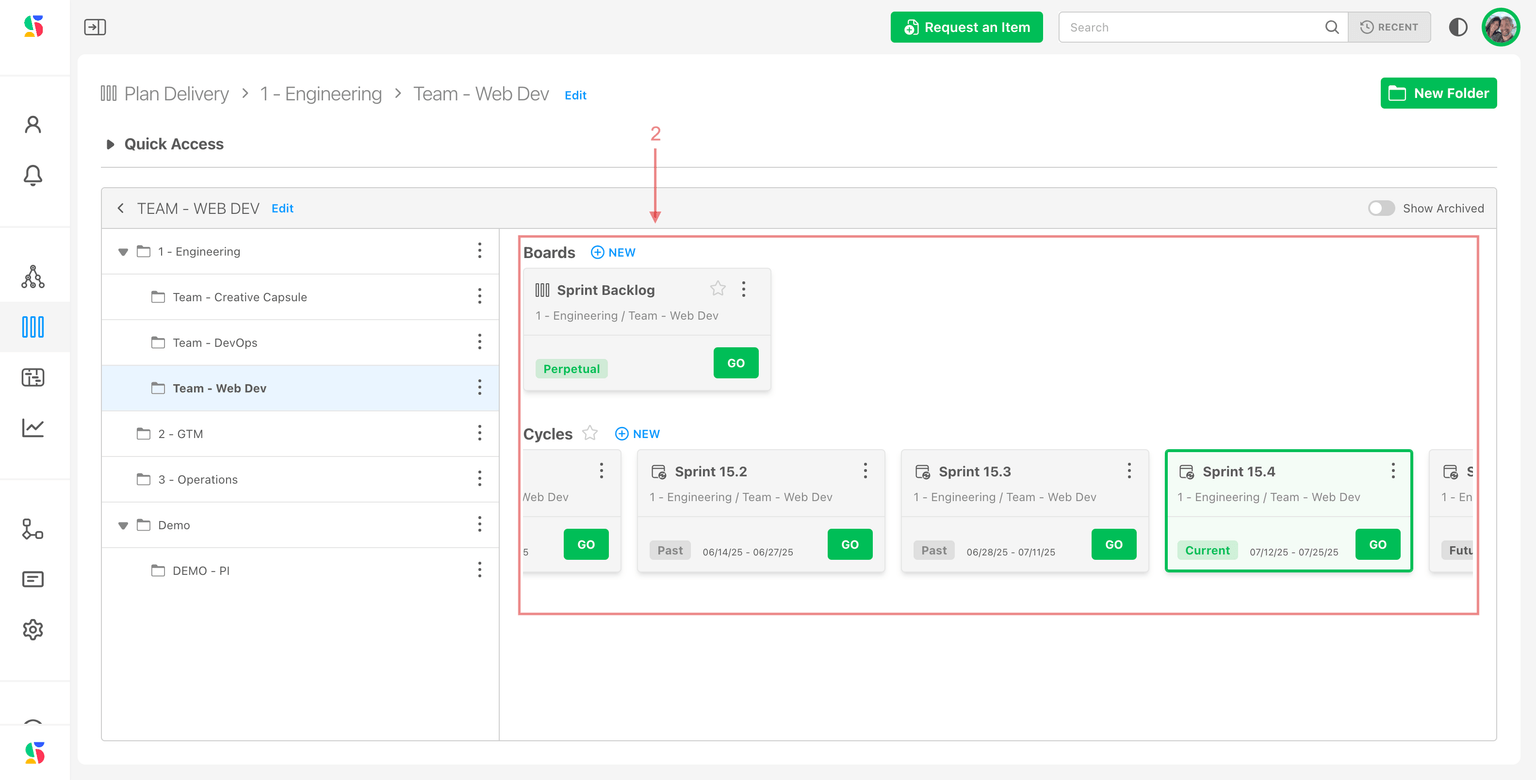
Create Boards and and Assign Workstream Items
Assign items into the appropriate board where execution happens.
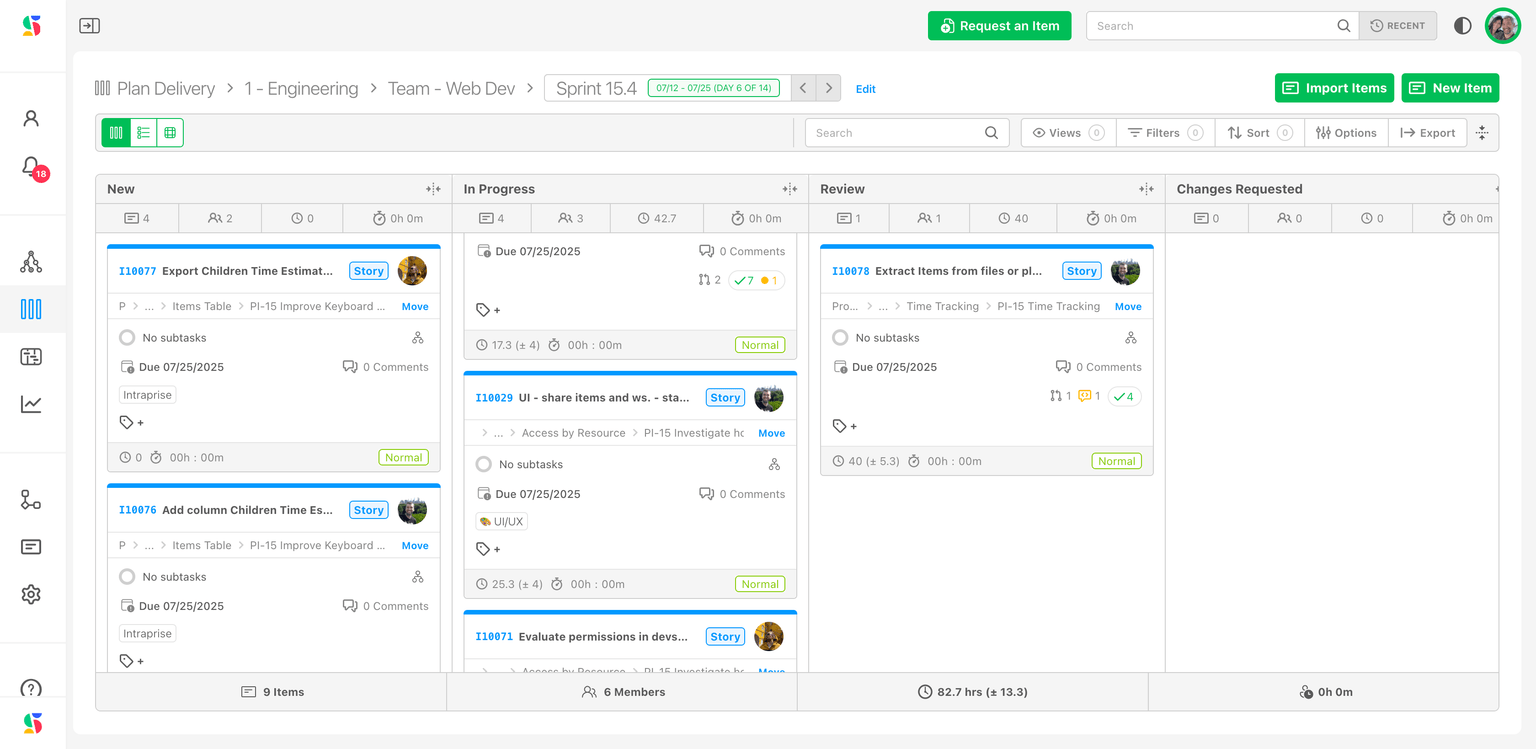
Goal: The boards in the Plan Delivery will be your execution view. This view is one that a project manager, delivery manager, or scrum master might operate in, one that executes the work to support the value delivery.
A parent item exists once in the Plan Value workstream hierarchy, but can appear on multiple boards via its child items.
Example: “Epic: Enhanced Login” parent item belongs to the “Customer Portal” workstream, but may be worked on by:
Design Team board (for UX/UI): design-related child items
Backend Team board (for API): backend-related child items
QA Team board (for testing): testing-related child items
DevStride tracks all this automatically — by relating child items to their parent and reflecting percentage complete.
3. Use Track Progress as a delivery timing guardrail
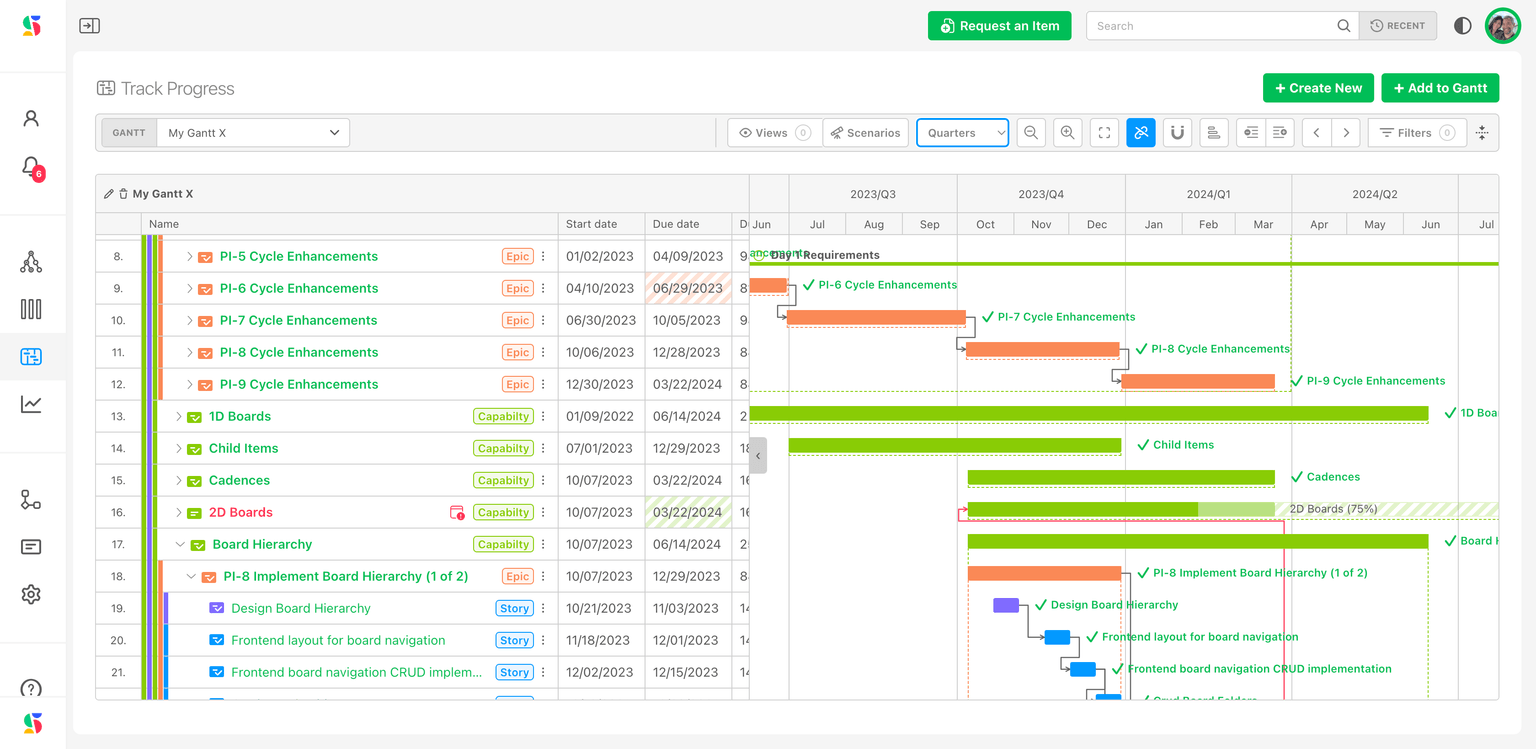
The interactive gantt charts in Track Progress provide a visual overview of:
- the status of the project
- the items that make it up
- dependencies
- the critical path
In addition to providing teams and leadership with status information, Track Progress creates the opportunity for updates and conversations with clients and stakeholders through:
- scenario planning for delivery timeframes and change requests
- sharing capabilities
4. Measure Performance with interactive reports
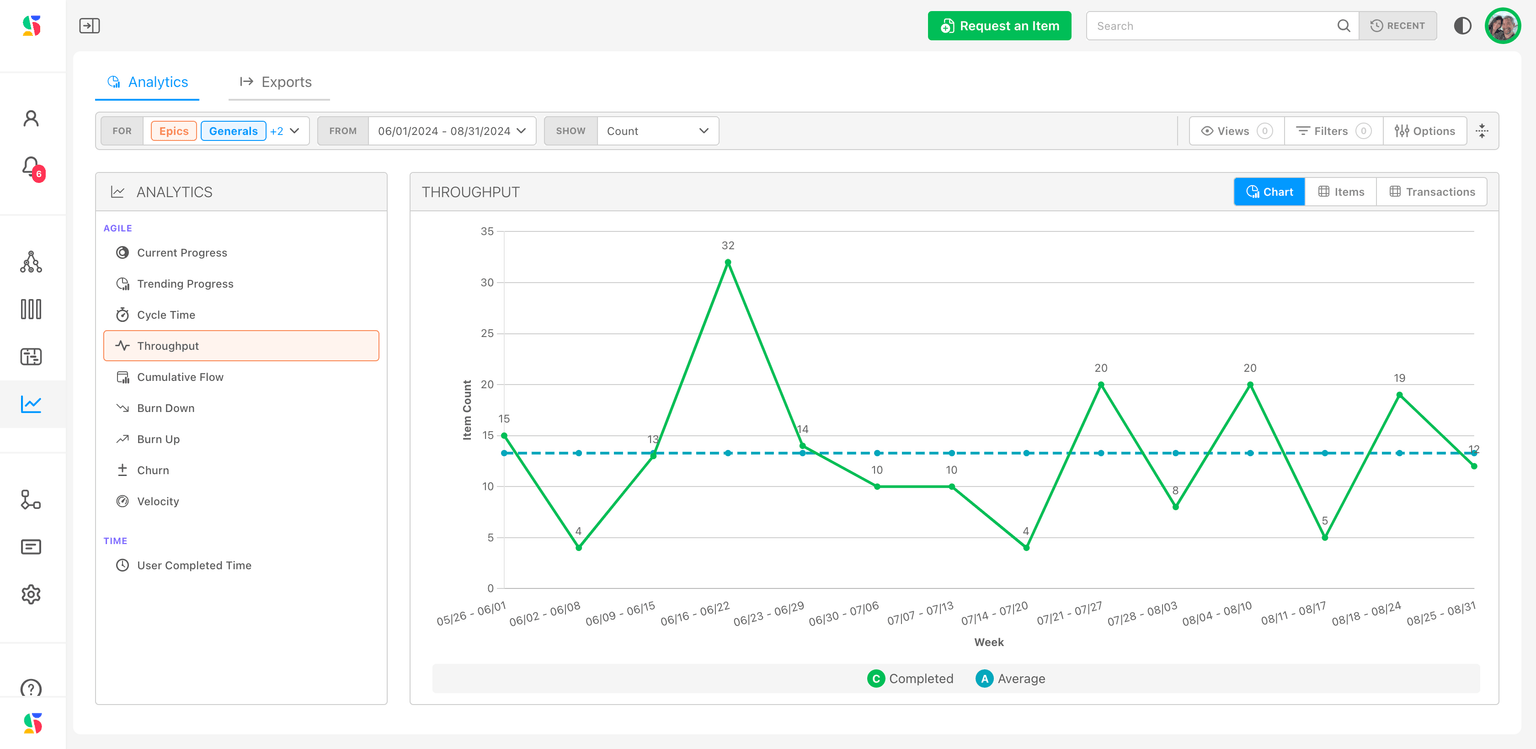
The Measure Performance module provides robust and meaningful reporting of progress, throughput, velocity, churn and more, creating the opportunity to track, refine, and improve processes and predictability project over project.
Pulling it all together
- Use the Workstreams view in Map Value to see the hierarchy of deliverables as it relates to your objectives and the value your organization is delivering.
- Use the Boards View in Plan Delivery to see what teams are actively executing.
- Use Gantts in Track Progress to see details of delivery timing.
- Use powerful reports Reports from a robust data model to pull metrics across multiple dimensions.
Ready to roll? Read on to set up DevStride to align your teams, manage dependencies, and deliver value at scale!