Report: Current Progress
Overview
Current Progress refers to the current state of completion of the project or cycle at a given point in time. In DevStride, Current Progress is measured by the number of items that have been completed and the amount of work remaining.
Current Progress is a snapshot of the project's current status, used to inform decisions and plan the next steps.
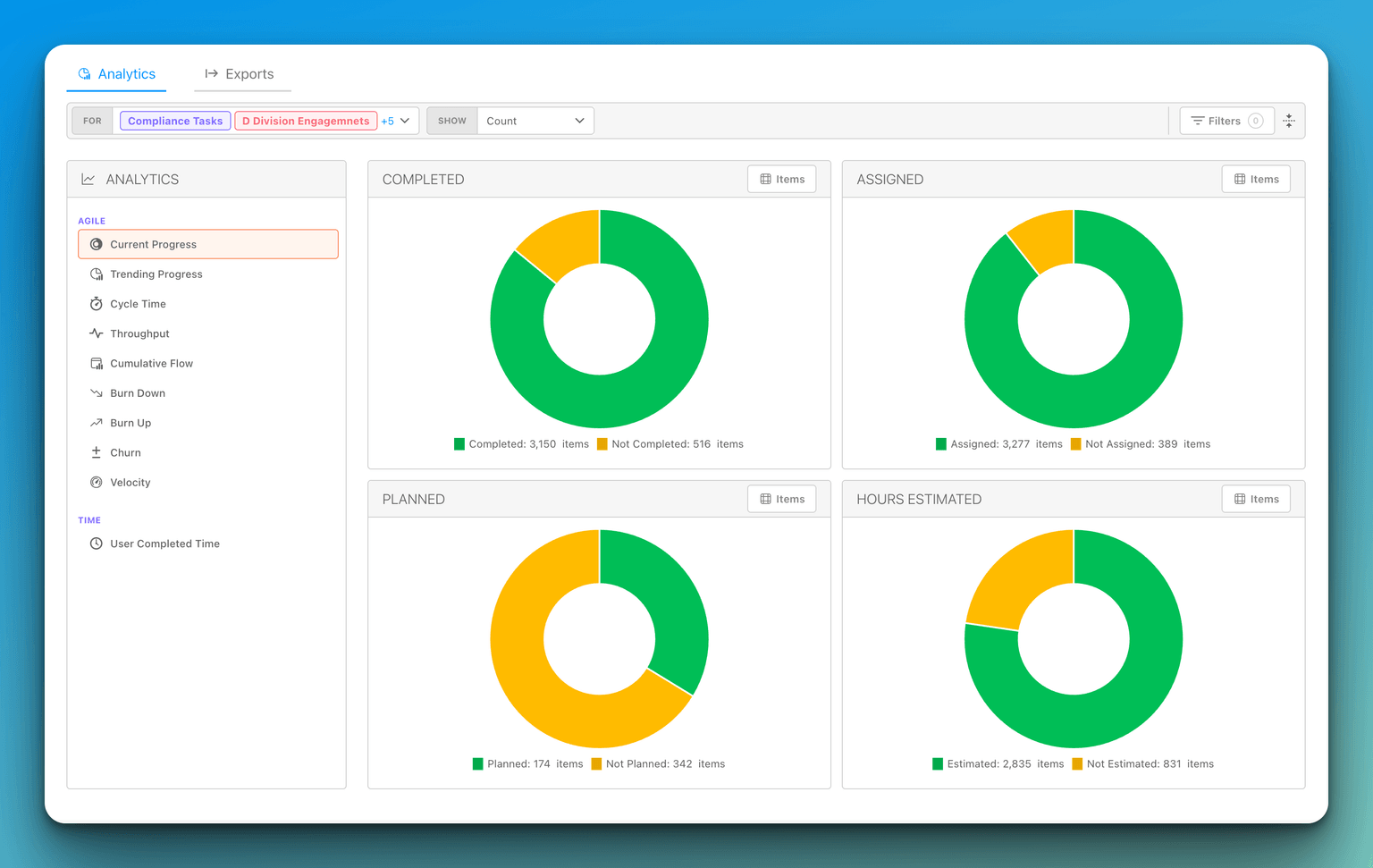
Reading the Donut Charts
The Current Progress report presents your work as a set of donut charts, each summarizing a different slice of the same item set. Depending on the Show mode you select (see Report Customization Options), you will see up to five donuts:
- Completed — items that have reached a Done status versus those still open.
- Assigned — items that have a person or persona versus those with neither.
- Planned — items that are planned versus those that are not yet planned.
- Hours Estimated — items that have a time estimate versus those that don't. This donut appears only when Show is set to Count or Time Spent.
- Points Estimated — items that have a point estimate versus those that don't. This donut also appears only when Show is set to Count or Time Spent.
Each donut reflects the same scope, filters, and date range you have applied to the report, so you can compare different dimensions of the same body of work side by side.
Open workload by persona
When your organization has personas, Open workload by persona shows open item counts, work waiting for a person, planned estimates, and point effort for each persona.
Work is counted under its chosen persona, or under the person's first active persona when no persona is chosen. Work with neither is Unspecified. A person with several personas is not counted once under every persona, and subtask estimates already included in their parent are counted once.
This describes current work and planned effort. It does not introduce availability budgets, cost rates, or a percentage split of a person's capacity. For time already recorded, use User Time Tracking or the Time Allocation Matrix, which retain the persona captured with that time.
Drilling into the Items Behind a Donut
Every donut has an Items button. Selecting it opens a sectioned items table that splits the donut into its two slices — for example Completed and Not Completed — and lists the specific items in each, so you can move from the high-level summary straight to the individual work. This is useful when you want to confirm exactly which items are counted as completed, unassigned, planned, and so on.
Filtering Completed Items Out of the Planned Donut
The Planned donut has its own Filter Completed toggle in its header bar. This toggle controls whether items that are already done are counted in the Planned versus Not Planned split:
- Off (default): the Planned donut includes completed (Done) items in its counts. You see everything that has been planned, regardless of whether the work has since been finished.
- On: completed items are filtered out of the Planned donut, so the chart reflects only planned work that is not yet done.
A few things to keep in mind:
- The Filter Completed toggle affects only the Planned donut. The Completed, Assigned, Hours Estimated, and Points Estimated donuts are unchanged.
- When you drill into the Planned donut's Items table, the list respects the same Filter Completed setting.
- Your choice is remembered per organization in your browser. It does not change the setting for other people in your organization.
Detailed Completion Stats (a separate, item-level view)
You may have seen a Detailed Completion Stats view that breaks completion down by work-type hierarchy level. This is a distinct, item-level feature and is not part of the Current Progress analytics report described above.
You open it from an item or workstream by selecting View details under its Completion Donut. The dialog's title is Detailed Completion Stats, and its Completion Stats section includes a Reporting on dropdown. When the item's work-type hierarchy has more than one level, this dropdown lets you choose which level the donuts are calculated for; it defaults to the item's direct-child work-type level (the level immediately below the item), so the modal matches the Progress Rollup donut. If the hierarchy has only a single level, the dropdown does not appear.