Boards and WIP Limiters
What a WIP limiter does
A WIP (work-in-progress) limit is the most items a status should hold at once. You set it per status inside a status collection. On any board using that collection, a Card-view column whose item count goes over the limit turns red and shows a WIP LIMIT (n) pill, where n is the limit.
That is all it does. It is a warning, not a gate:
| Column turns red when | the column holds more items than the limit (a column exactly at the limit is not flagged). |
| Dropping another card into a red column | still works. Nothing blocks, no confirmation, no toast. |
| Counted | items on this board in that status, as currently loaded. Other boards sharing the status collection are not counted. |
| Shown in | Card view only — including collapsed columns. Table and 2D views do not show WIP state. |
| Enforced by the server or automations | No. There are no WIP triggers or conditions. |
Set a WIP limit
You need the organization-settings capability (default Admin).
- Open Configure Settings → Data Model → Item Statuses.
- In 2 - Group into Collections, open the collection your boards use.
- In the WIP Limit column, enter a number for each status that needs one (1–2 in the image). Leave the field empty (shown as -) for no limit. The change saves on its own.
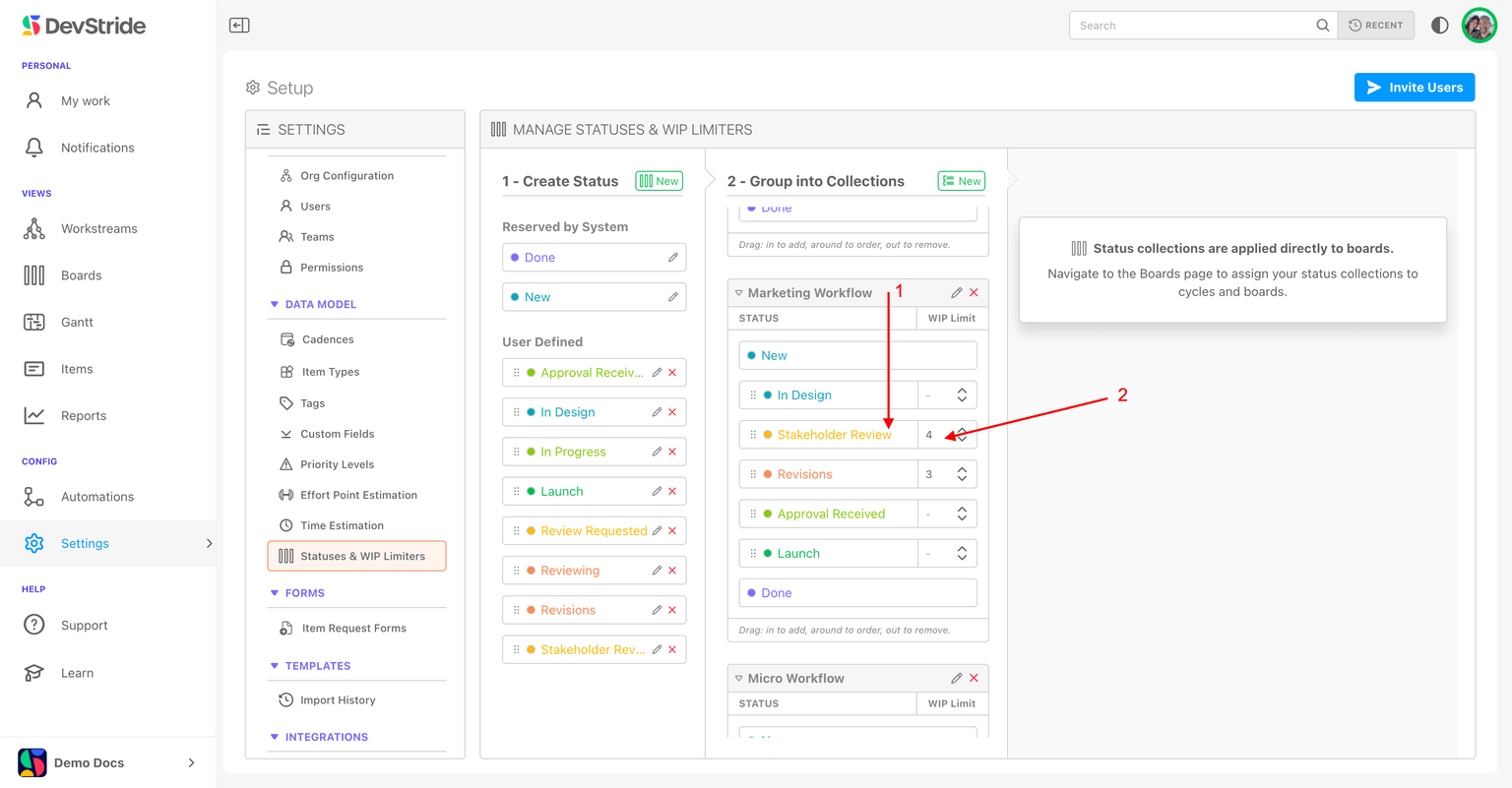
- Only your own statuses can take a limit. The system statuses New and Done cannot.
- A limit belongs to the status within that collection. The same status can have a different limit in another collection.
- Every board on the collection gets the limit at once — perpetual boards and all current and future cycles.
The full statuses page: Item Statuses.
Working with a red column
The signal is deliberately soft so an emergency can still be pulled in. When a column goes red:
- finish or hand off something in that status before starting more;
- if it is red every sprint, the limit is wrong or the stage is understaffed — change one of them;
- if you need a hard stop, agree the rule as a team; DevStride will not enforce it for you.
See the warning in context in Track and move work with board views.
Track and Move Work with Board Views
Work a board day to day: the control ribbon, grouping the board into swimlanes in Card and Table view, dragging and ranking cards, Board Totals, hierarchy in the Table view, axes and empty-cell hiding in the 2D view, WIP warnings, and jumping to a board from an item.
Board & Folder Permissions
Control who can view, edit, and manage your boards and folders with user, team, and organization-level permissions, and how folders pass access down to everything inside them.