Overview
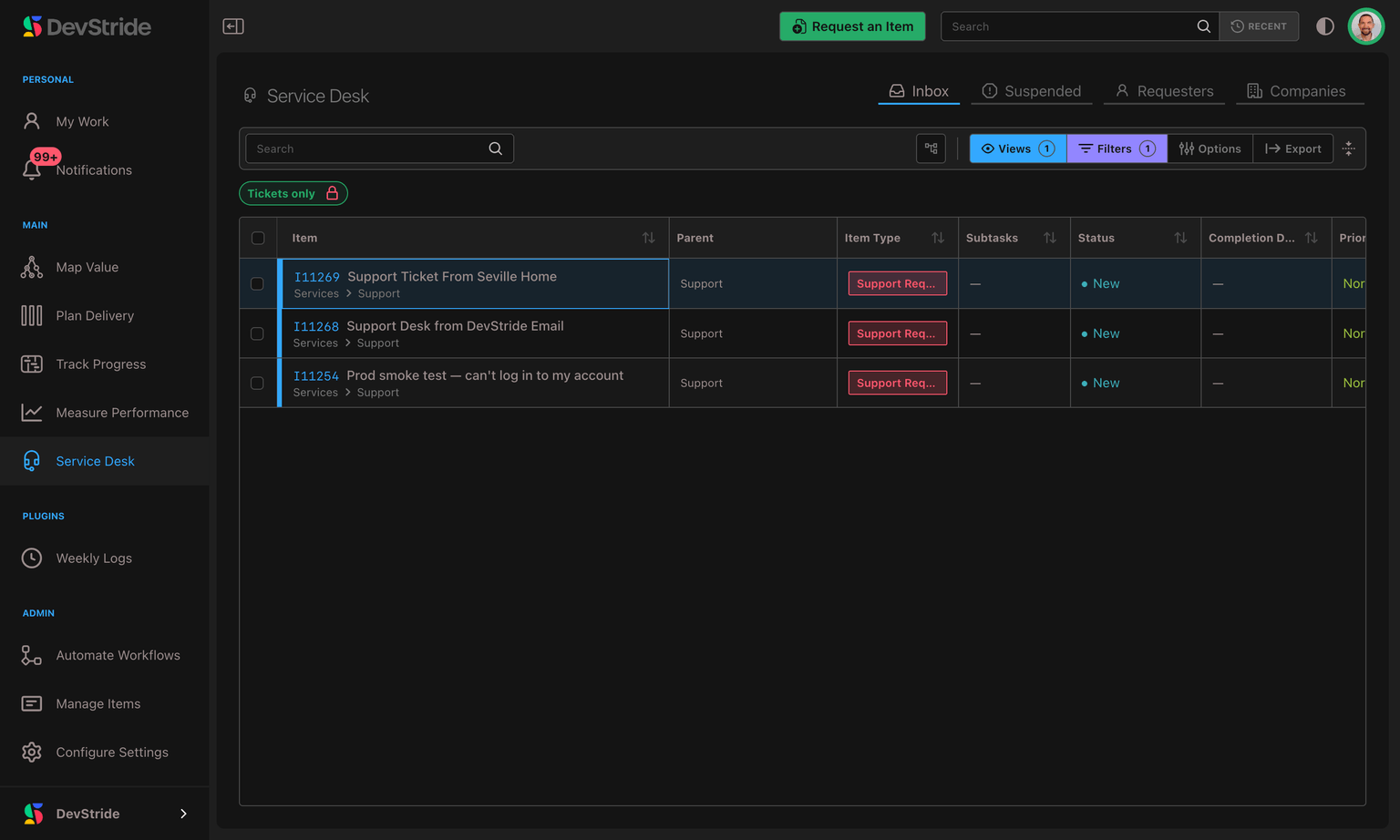
Service Desk lets your team receive support requests from customers, reply to them, and track every conversation as ordinary DevStride work — all in one place. An email arrives at your support address; that email becomes a ticket in DevStride; your team triages it, replies, and closes it out, with the whole back-and-forth captured on the item.
You'll find it as the Service Desk module (the headset icon) in the left sidebar once it's been turned on.
Why it exists
Support work and product work usually live in two different tools — a help desk for customer email and a work tracker for everything the team actually builds. That split means copying tickets back and forth, losing context, and answering customers from a system that has no idea what your team is working on.
Service Desk closes that gap. Because a support ticket is a DevStride work item, a customer request can sit right next to the engineering work it depends on, roll up into the same boards and reports, and be assigned, prioritized, and scheduled like anything else. Your support conversation and your delivery work finally share one home.
The big ideas
A few concepts make everything else easy to understand. Learn these five and the rest of the module is intuitive.
| Concept | What it means |
|---|---|
| A ticket is a work item | Tickets aren't a separate kind of record. A ticket is a normal DevStride item that happens to have a requester — the customer who asked for it. Everything you already know about items (boards, owners, priorities, custom fields, due dates) applies. |
| Requester | The person who raised the request — usually a customer, but anyone who writes to your support address becomes the requester of the ticket it opens, including someone on your own team. A requester is a contact record, not a workspace membership: they hold no role and never consume a paid seat, however many tickets they raise. |
| Company | An optional grouping of requesters who belong to the same customer organization (matched by email domain). Companies let you set per-customer defaults and see all of a customer's requests together. |
| Channel | How a request comes in. In this release the channel is email: mail sent to an address you set up becomes tickets — whether a customer wrote it, someone on your team wrote it, or a colleague forwarded it in. |
| Public vs. internal conversation | Every ticket carries two streams of conversation. A Reply to customer is emailed to the requester; an Internal note is visible only to your team. The line between them is enforced everywhere, so private discussion never leaks to a customer. |
What you can do in this release
This is Version 1 of Service Desk, focused on two-way email support — now joined by a branded self-service portal:
- Receive email as tickets, automatically filed where you want them — every message to a support address opens one, whoever sent it.
- Forward a customer's message in and have the ticket opened in the customer's name rather than the colleague's — they get the acknowledgement, the ticket takes their subject and words, and the covering note your colleague wrote stays internal.
- Reply to customers directly from the ticket — your reply is emailed back and threaded into the same conversation.
- Keep internal notes alongside the customer conversation, safely separated.
- Manage requesters and companies, including merging duplicates and erasing a requester on request.
- Triage from an Inbox, review anything held back in a Suspended queue, and filter and report on support work like any other item.
- Collect requests through forms in addition to email.
- Give customers a branded self-service portal — customers sign in to your company's Customer Support Portal with a passwordless magic link or one-time code, then browse and track their own requests, follow each conversation, reply with attachments, update the details you expose to them, mark a request solved, and submit new requests through the forms you publish there — all without a password to create or remember.
- Promise and track response times with SLAs — business-hours-aware timers that warn you (or reply automatically) before a promise is missed.
- Act on time itself with time-based automations — close tickets that have sat Solved, escalate the ones nobody has answered, and nudge customers who've gone quiet, counted against your real business hours.
- Deflect requests before they arrive with the Knowledge Base — publish articles to a searchable Help center in the portal, and suggest matching articles while a customer is describing their problem on the request form.
In this section
- Enabling Service Desk — turn the module on (and what happens when you do).
- Email Channels & Setup — create a support address, forward your inbox to it, and see who a forwarded message belongs to.
- Requesters & Companies — manage customer identities and per-company defaults.
- Customer Support Portal — give customers a branded, passwordless sign-in to a self-service portal.
- Working a Ticket — triage, reply publicly, and keep internal notes.
- Request Forms — collect structured requests through a form.
- The Suspended Queue — review mail held back for safety.
- Finding & Filtering Tickets — query support work across the app.
- Service Level Agreements (SLA) — promise response times and track them against your business hours.
- Time-Based Ticket Automations — auto-close solved tickets, escalate unanswered ones, and set your business hours.
- Permissions — control who can do what with roles.
Report: Time Allocation Matrix
Roll recorded time up through your work-item hierarchy or by persona, month by month, and export it to Excel.
Enabling Service Desk
Service Desk ships off. An administrator turns it on once for the organization — here's how, what it switches on, and how to turn it back off.