Request Forms
Email is the primary way requests come in, but it isn't the only one. A request form lets a customer submit a request through a structured form instead of free-form email — useful when you want specific details up front (an account name, a category, a priority) rather than whatever the customer happens to type.
Building a form
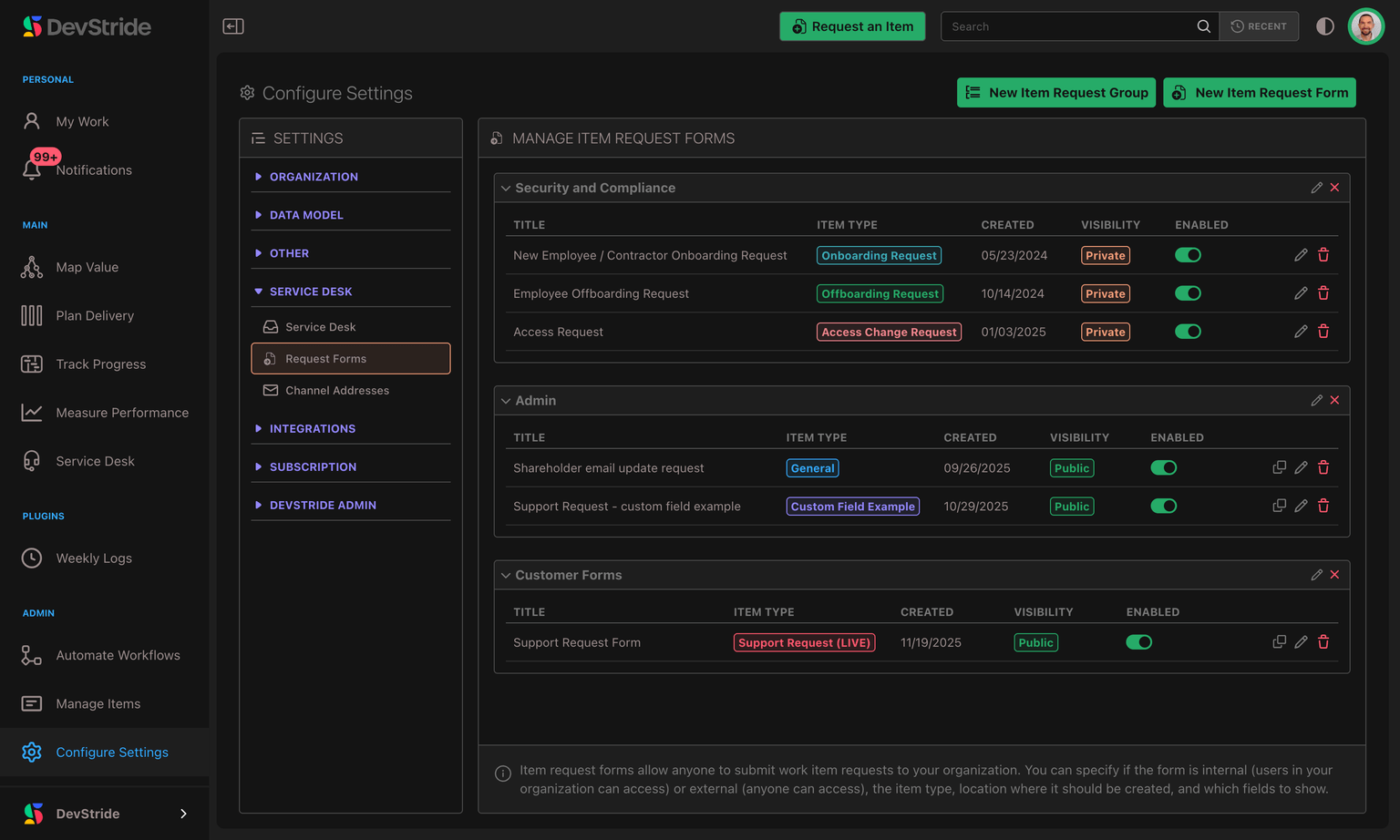
Manage forms in Settings → Service Desk → Request Forms. A form is made of components you arrange in order:
- Headings — section labels and instructions that guide the submitter.
- Item fields — built-in fields like title and description.
- Custom fields — your own fields, so submissions arrive with exactly the structured data you need.
Each field can be labeled, given a default, and marked required or hidden. A required rich-text field, such as the description, must contain real content — an empty paragraph does not satisfy it. A form also has a title, a destination (the workstream or item its submissions are filed under), and the work type its tickets are created as.
You can group related forms together for easier management, and enable or disable a form to control whether it's currently accepting submissions.
Which forms create tickets
A request form creates whatever work type it is configured for, and only some of those are Service Desk tickets. Forms that create tickets now carry a badge saying so in the forms list, so you can tell at a glance which of your forms feed the Inbox and which create ordinary work items. Nothing about the form changes — the badge is there so you do not have to open a form to remember what it does.
How a submission becomes a ticket
When a customer submits a form, DevStride creates a ticket from it just like an inbound email — filed at the form's destination, created as the form's work type, with the submitted values populated on the item. The submitter becomes a requester, and the request joins your Inbox alongside email tickets.
To keep out junk, a form submission is email-verified: the submitter confirms their address before the request is finalized, and they receive a confirmation that it was received.
Forms on a channel address
You can attach a form to a channel address as its Default request form, so email tickets from that address inherit the form's field set. This is a convenient way to give email-sourced tickets the same structured fields your form collects.
Forms in the Customer Support Portal
A form can also be listed in the Customer Support Portal, on its Submit request page — so a signed-in customer can raise a request from inside the portal instead of finding your form's link or writing an email.
Listing is a per-form setting, off by default, and any enabled form can be listed — public or private. A private form that is listed stays off its shareable link and out of your team's Request an Item menu; the portal is the only place customers reach it. Nothing else about the form changes: the same fields, the same filing rules, the same ticket at the end. A listed form appears on every customer portal in your organization.
A form with a file-upload field lists like any other. Every file a customer attaches is scanned for malware before your team sees it, and a required upload field has to be answered with one of the customer's own uploads. Customers can attach screen recordings as well as images and documents: videos (MP4, MOV or WebM) can be up to 100 MB, and every other file type up to 25 MB. A video placed in the request's description stays there, with playback controls, on the ticket your team sees and on the customer's view of their request.
What customers see on a listed form. Customers are never shown a Relationships field or a user / item reference field — those are for your team. If such a field is hidden and carries a default (a default reviewer, say), that default still applies to the customer's ticket; if the work type or the form requires a reference field, you must give it a default before the form can be saved as public or listed, or no customer submission could ever be filed. A customer can only fill in the fields they can see; hidden fields keep the defaults you configured. If a default was saved through the API in a shape the ticket cannot take, such as a due date that is not a real date or a relationship to the form's own destination, that default is skipped and the ticket is filed without it, so the customer's submission still goes through.
Required fields are enforced when the request is submitted, on the portal, the public link and through the API alike — a submission that leaves one unanswered is refused with a message naming the field. Two kinds answer themselves: a required checkbox left unticked counts as "no", and a required calculated field is worked out from its formula once the ticket exists. Customers do not need to fill in calculated fields before submitting. Explicit No and numeric 0 answers are saved as entered, including when the form has a different default; they are not treated as missing answers.
Working a Ticket
Triage from the Inbox, reply to the customer over email, and keep internal notes safely separate. The day-to-day of running support in DevStride.
The Suspended Queue
Some inbound mail is held back for safety instead of becoming a ticket. The Suspended tab is where you review what was held and why, and the Dropped mail tab lists every email that didn't become a ticket.