Email Channels & Setup
A channel address is the email address support requests arrive at. You create one in DevStride, then forward your real support inbox (for example support@yourcompany.com) to it. From then on, incoming customer requests become tickets, and every reply you send goes back over email. Automatic replies and recognized delivery-failure notices are held in the Suspended queue for review. Newsletters and mailing-list mail still become tickets, but DevStride doesn't send them the usual "we have received your request" email, since that would only reach a no-reply address or a whole list.
Creating a channel address
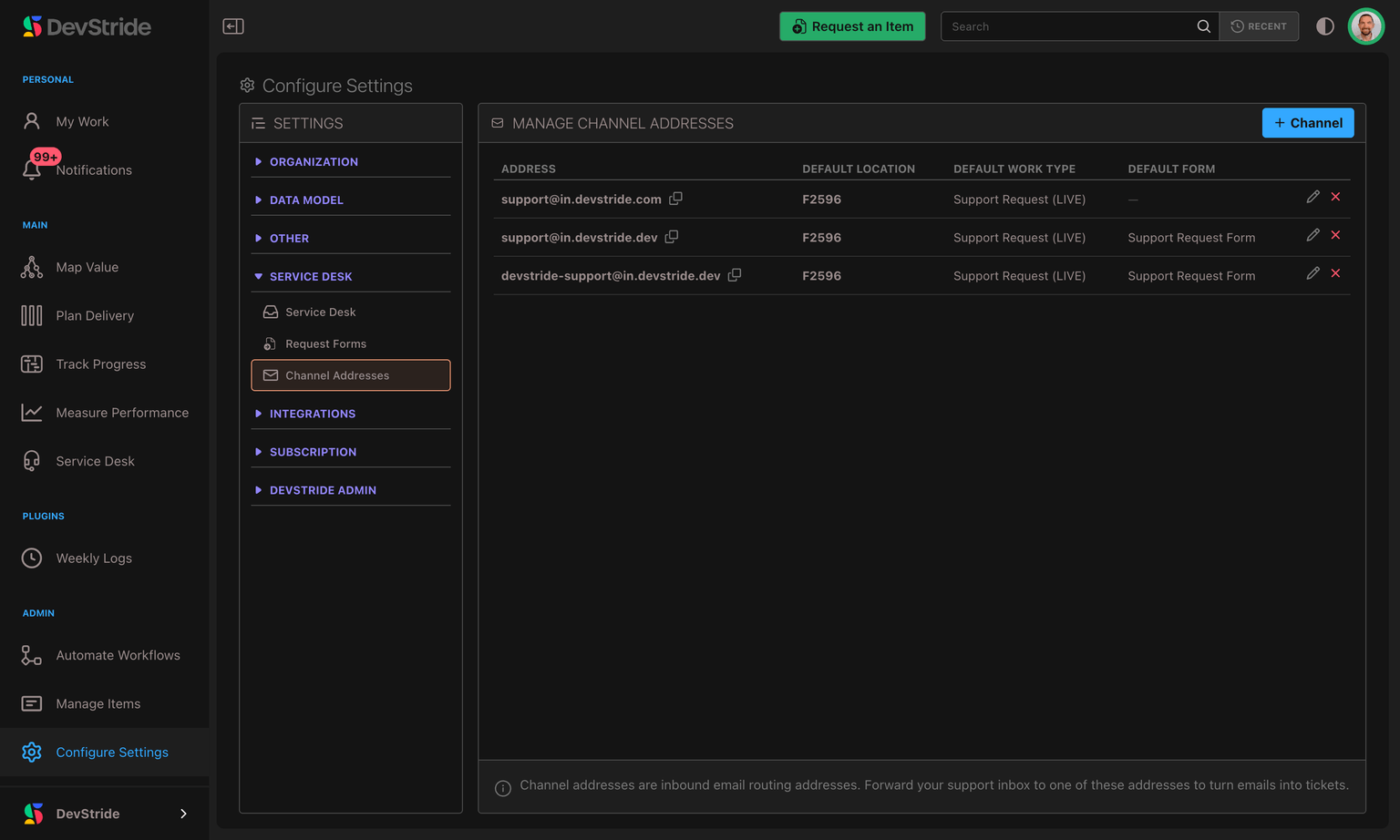
- Open Settings → Service Desk → Channel Addresses.
- Click + Channel.
- Fill in the New channel address dialog (fields below) and save.
The fields
| Field | What it does |
|---|---|
| Address (required) | The local part of your DevStride inbound address — you type the part before the @, and DevStride appends its inbound domain (for example acme-support@in.devstride.com). Lowercase letters, numbers, dots, and hyphens only. |
| Default location (required) | The workstream, folder, or item where new tickets from this address are filed. Think of it as the bucket the address drops work into. |
| Default work type (required) | The work type new tickets are created as (for example a Support Request type). |
| Default request form (optional) | Applies a request form's field set to tickets from this address. Choose No form to skip. |
| Notify on new ticket (optional) | A default assignee, plus watcher users and teams, applied automatically to every new ticket from this address — so the right people are notified without setting up an automation. |
support@in.devstride.com is almost certainly taken. Include something specific to you, like acme-support. As you type, DevStride checks availability live and suggests an address that's free.support@yourcompany.com forwards to it. Customers keep writing to your familiar support address; DevStride does the rest behind the scenes.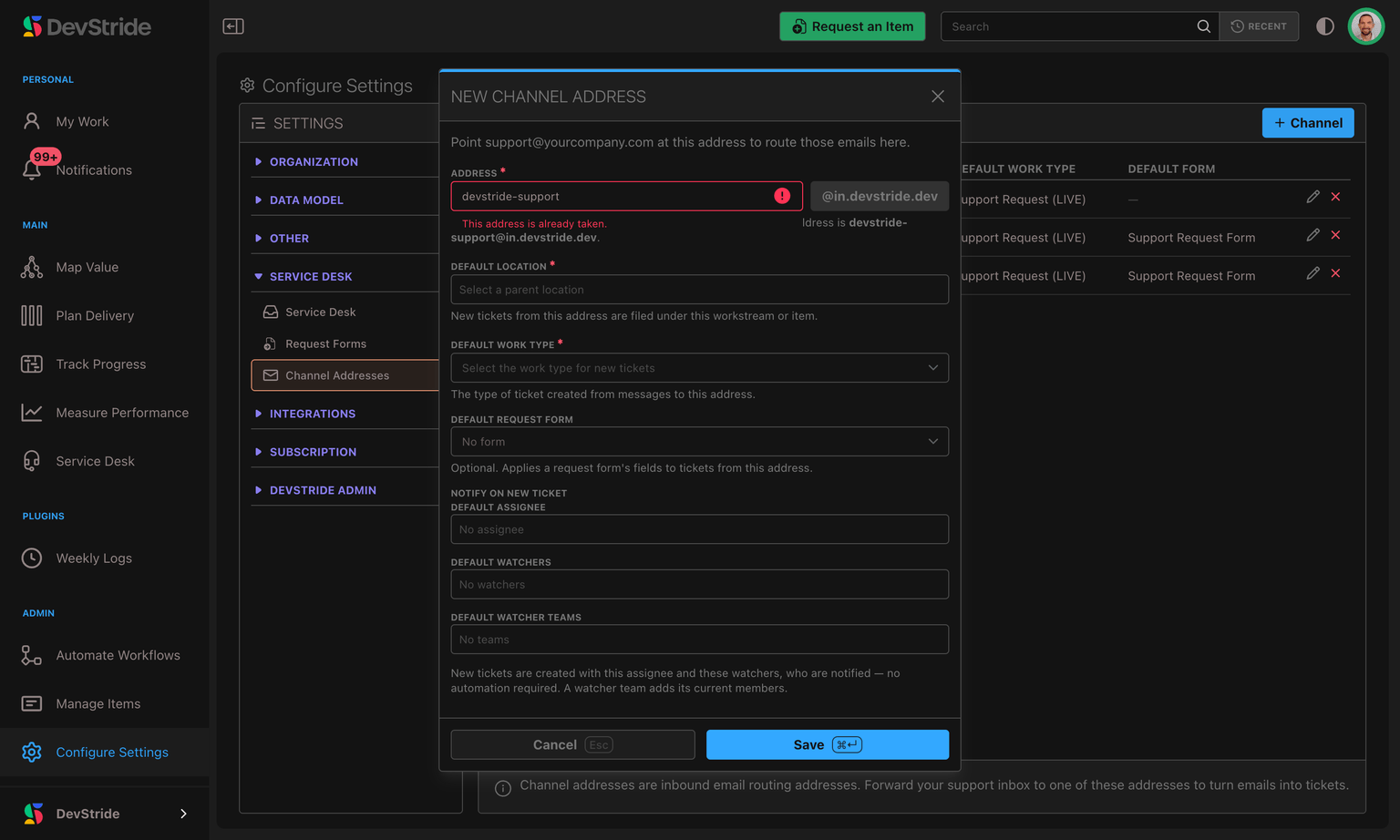
Editing an address
Click the pencil icon on a row to change its defaults. You can change the location, work type, form, or notification targets at any time.
The address itself is fixed once created — it can't be renamed, because mail is already routed to it. Changes to the defaults apply to future tickets only; tickets already created keep the values they were filed with.
How email is matched to a conversation
You don't have to manage threading — DevStride figures out whether an incoming email is a brand-new request or a reply to an existing ticket, and routes it accordingly:
- A new request that passes the inbound checks creates a new ticket — from anyone, including a member of your own organization. The email's subject becomes the ticket title, the body becomes the ticket's Customer description, the sender becomes (or is matched to) a requester, and your Notify on new ticket defaults are applied. A message a colleague forwards in is the exception — see below.
- A reply is added to the same ticket as a new comment, keeping the whole conversation in one place. DevStride recognizes replies from the email's threading information, so a customer simply replying in their mail client lands on the right ticket. That includes a conversation that never went through DevStride's own emails: when the customer and your team reply-all to each other with the channel address copied in, each reply joins the ticket the conversation started on. Only the ticket's customer, or a member of your organization whose email passes your domain's sender checks, can add to a ticket this way — anyone else who replies gets a ticket of their own.
- Recognized delivery-failure notices are held in the Suspended queue as auto-responses, so a bounced email does not open another ticket.
- Attachments are saved to the ticket's Assets tab in an Email Attachments group. They also appear as linked filenames beside the message that carried them: files from the first email sit beneath the Customer description, while files from later replies sit beneath the matching Discussion comment. Both links open the same saved file, so you can work from the conversation or browse everything from the Assets tab.
When you send a Reply to customer from a ticket, DevStride emails it to the requester and threads it so their next reply comes back to the same ticket. Quoted "On such-and-such date you wrote…" trails are stripped automatically, so each comment shows only the new message — not a growing pile of quoted history. (See Working a Ticket.)
When someone on your team emails or forwards a message in
Your own team's mail reaches the channel address too — someone writes in from their work address, or hits Forward on a message a customer sent them directly. Every one of those emails opens a ticket in the Inbox. What DevStride works out is who the request really belongs to.
Mail from someone on your team
An email from a member of your organization creates a ticket like any other. That person becomes its requester and receives the same acknowledgement a customer would, and the ticket queues in the Inbox alongside everything else. A request from a colleague is still a request — it isn't filtered out or filed somewhere quieter.
Replying to a customer with the channel address copied
When you answer a customer from your own mailbox and copy the channel address in (Reply all), DevStride adds your email to the customer's ticket rather than opening a new one:
- If the customer was on your email (To or Cc), it appears on the ticket as your public reply — they already have it, so DevStride doesn't email it to them a second time.
- If the customer wasn't on it — a discussion among colleagues with the support address copied — it's added as an internal note.
- A forward (a subject starting Fwd:, Fw:, or your mail client's equivalent) is always kept as an internal note on the ticket, unless it qualifies as the customer's own forwarded words as described below. Your covering note around someone else's message is never published.
A forwarded customer email
When someone forwards a customer's message to the channel address, DevStride credits the ticket to the customer, not to the colleague who forwarded it:
- The original sender becomes the requester, and receives the acknowledgement.
- The ticket takes the original message's subject and body, so its title reads the way the customer wrote it rather than as a forward.
- The colleague who forwarded it is added as a watcher, so they can follow where the request goes.
- Whatever they wrote above the forward — "can someone pick this up?" — is kept as an internal note, never shown to the customer.
Forward a customer's reply into a ticket that already exists and the same split applies to the conversation: the customer's own words are published as a comment from them, and your colleague's covering note stays internal.
When a forward is credited to the forwarder instead
Putting a person on your requester list who never wrote to you — and then emailing them — is worse than crediting nobody, so DevStride only hands a ticket to a customer it can be sure of. A forward is credited to the original sender when all of these hold:
- The message positively passed DMARC — a stricter bar than the Suspended queue applies, which only holds mail that explicitly fails a check.
- The subject carries a forward prefix — Fwd:, Fw:, or your mail client's equivalent.
- It carries one original message, not several. Two or more bundled together are ambiguous, so neither is credited.
- The address inside is genuinely an outside customer — not one of your own channel addresses, not a current member of your organization, and not a requester you have erased, blocked, or merged away.
If any of that doesn't hold, the ticket is still created — nothing is dropped — but the colleague who forwarded it becomes the requester, and the forwarded text is kept internal. That is the deliberately safe outcome: an unverified forward never publishes anything to a customer, and never emails a stranger. The ticket is in your Inbox, so you can read it and decide what it really is.
When the customer wrote to a mailing list or Google Group
A shared address such as support@yourcompany.com is often a Google Group or mailing list. When a customer writes to it, the list rewrites the sender so the message appears to come from the list: "Dana Whitfield via Support" <support@yourcompany.com>. When a colleague forwards that message in, DevStride recognizes the rewrite and credits the ticket to the real person:
- From the list's own record of who originally sent it, which lists keep in the forwarded message's headers.
- Otherwise, from the one outside address in the forwarded text that is spelled from their name (for example
dana.whitfield@…ordwhitfield@…for Dana Whitfield). Two or more candidates are ambiguous, so none is used.
If DevStride can't tell who the person is, the colleague who forwarded it becomes the requester, as with any forward it can't credit. The group's own address is never made the requester, so acknowledgements and replies never go to a whole list. If a ticket still ends up under the wrong person, change its requester.
Removing a channel address
Click the x icon on a row and confirm in the dialog:
Remove ? Inbound email to this address will stop creating tickets. Existing tickets are unaffected.
Removing an address does exactly that and no more:
- New mail to that address stops becoming tickets. Routing for the address is shut off immediately.
- Existing tickets, conversations, and requesters are untouched. Nothing already created is deleted or changed.
- Late-arriving mail is safely dropped. If a message trickles in to a just-removed address, DevStride discards it cleanly — it won't create a stray ticket or a phantom requester.
Where a ticket actually lands: location overrides
The Default location on the channel address is the baseline destination. One thing can override it: a company default location.
If the requester belongs to a Company that has its own default location set, new tickets from that company are filed there instead — handy when you want each customer's requests grouped under their own workstream. The address's default work type is always used either way; a company override only changes the where, not the what.
If a company's override points at a workstream or item that has since been archived or deleted, DevStride quietly falls back to the channel address's default location, so a request is never lost.
Enabling Service Desk
Service Desk ships off. An administrator turns it on once for the organization — here's how, what it switches on, and how to turn it back off.
Requesters & Companies
Requesters are the customers who raise tickets; companies group them. Manage their details, set per-company defaults, merge duplicates, and handle erasure requests.