Admin Onboarding - Organizing the When: Understanding Planning Cadences
Overview - Managing the "When" through Cadences
In DevStride, the "how" and "when" of the work is managed through either perpetual (non-date-driven) or cycle-based boards:
Cycle-based board manages the work using cadences.
Cadences (such as weekly, two-weeks, monthly or quarterly periods) can be applied to boards to create recurring intervals.
Recurring intervals provide organizations a structured approach to establishing predictable workflows, managing teams, and ensuring efficient work execution.
Perpetual boards, on the other hand work like an ongoing to-do list. Many organizations use perpetual boards for backlogs or functions like operations.
In this article, we will focus on cycle-based boards and cadences.
Understanding Cadences
Using cadences, DevStride ties the timeframe of your cycle-boards to the entire data model of the system for the purposes of planning, capacity, automations, assignments, and reporting.
Setting up cadences provides a repeating, time-boxed approach to planning and executing work. They allow teams to organize a queue of work within predefined time periods or cycles, ensuring consistency, capacity management, and measurable progress.
Since the work cycles repeat at a set cadence, the team is able to assess their true capacity and can adjust the amount of work that is taken on for each cadence.
This approach allows the team's deliverable timing to be more predictable. Teams can refine future estimates based on past performance, providing understandable and defensible projections.
Cadences are like a regular heartbeat that provides a consistent pulse for the timing of work.
Software development organizations practicing agile approaches often use a standard that includes the following:
Program Increment (PI) - usually 12 weeks - that identify which features will be developed or addressed during that period.
The Program Increment typically breaks down into 6 sprints.
Sprints - are typically 2 weeks - and contain the tasks we commit to for that brief period.
So for agile development organizations, 2 week sprints that roll up into 12 week PI planning periods are a good approach to cadences.
Non-development organizations, such as marketing teams or service providers, might have cadences that look more like monthly and quarterly time-boxes.
If you have more than one type of team (say, both development and services), create a cadence that makes sense for each of them. You can create as many cadences as you wish.
One consideration - be careful to use name the cadences so that they are easily identifiable for the boards and working groups using them.
Items that a project team is ready to commit for work are moved to boards. Then a cadence can be applied to the board to dictate when the work should be done.
Here's the cadence set-up screen, below. The cadences in this image are just examples - here, we are showing a longer Program Increment cadence (1) - typically 12 weeks, and smaller sprint cadences (2) - typically 2 weeks.
There is no limit to the different cadences or durations you can set up for use in your organization.
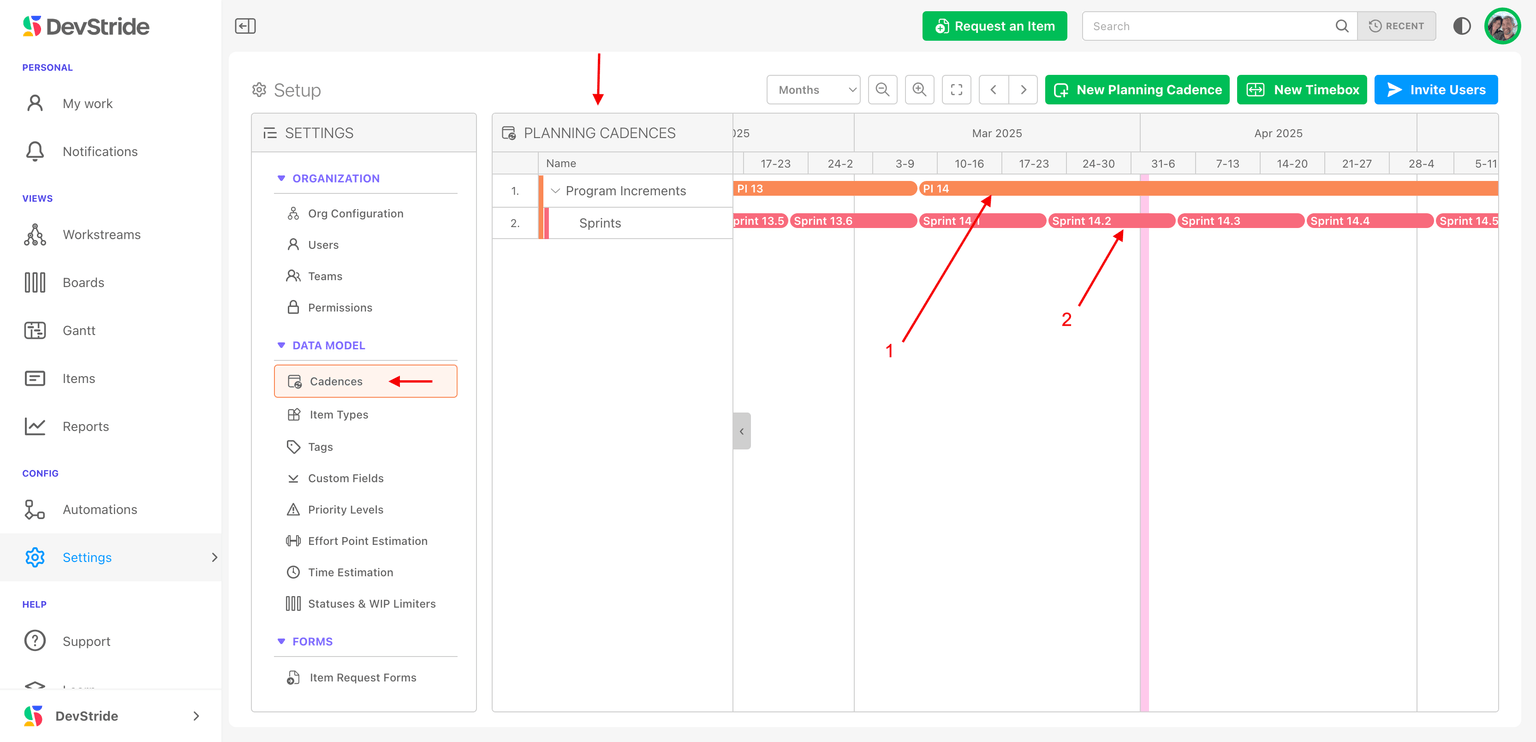
Cadence Hierarchy and Nesting Capabilities
DevStride supports a nested cadence structure, allowing users to create parent-child relationships for planning at different levels, such as:
In Scaled Agile planning:
Program Increment (PI) (e.g., every 12 weeks)
→ Sprint Cadences (e.g., every 2 weeks)
→ → Daily Work Units
→→→ etc.
In Waterfall planning:
Annual planning
→ Quarterly Planning
→→ Monthly Planning
→→→ etc.
This hierarchy ensures that long-term initiatives (such as product development features or marketing campaigns) are broken down into smaller, manageable tasks and timelines.
For example, in larger projects or initiatives, product development is often managed during a lengthier program increment planning cadence. Then, units of work (such as features or epics) are decomposed into smaller units of work such as user stories or tasks. These shorter tasks are managed in sprint cadences within that hierarchy.
For other initiatives, like marketing, campaigns might represent the larger units of work during a quarterly cadence, which is then broken down into monthly and weekly cadences.
What this gives you
Support for any framework: DevStride cadences are flexible and methodology agnostic. **
This is incredibly powerful and means DevStride allows you to plan using cadences whether your teams use an agile approach, employing typical 2-week sprints, or prefers to manage project planning on a monthly, quarterly, or other basis, as in waterfall and hybrid frameworks. DevStride also accommodates multiple teams using different cadences.
A master calendaring system: DevStride Cadence Settings provides you with a master calendar. All the cadences and timeboxes for your teams can be managed from here. Sprints don't have to be managed or input manually, which avoids date input errors.
Instead, automatic board creation ensures alignment between work cycles and execution tracking.
Gantt Chart Connection: In addition, the functionality extends to the gantt chart feature for teams who have date-driven deliverables.
Unparalleled flexibility: Cadences offer unmatched flexibility in that they can be set by each working group for the time cycles they prefer to use.
Business Benefits of Cadences
Predictable Planning: Establishes a regular rhythm for work execution.
Performance Tracking: Measures execution efficiency against planned work.
Scalability: Supports a hierarchy of cadences for different planning levels.
Next Up: How to Set up Cadences