Admin Onboarding - Organizing the When: Understanding Planning Cadences
Boards answered who. Cadences answer when, for teams that work in repeating periods. A perpetual board is an endless list; a cycle board runs on a cadence, and each of its cycles has a start and end date that its items inherit.
Three words, one idea
| Term | What it is | Example |
|---|---|---|
| Cadence | The rule: "a new period every N weeks", with a naming pattern | "Sprint, every 2 weeks" |
| Timebox | One dated instance generated by the rule | Sprint 14: 6–17 Oct |
| Cycle | A timebox as a team experiences it on a cycle board | The Sprint 14 board |
Think of a cadence as a recurring calendar event. The event's rule (every other Monday) is the cadence; each occurrence on the calendar is a timebox; the meeting you actually attend is the cycle. You define the rule once, in Settings, and DevStride generates the dates. Nobody types sprint dates by hand.
Nesting cadences
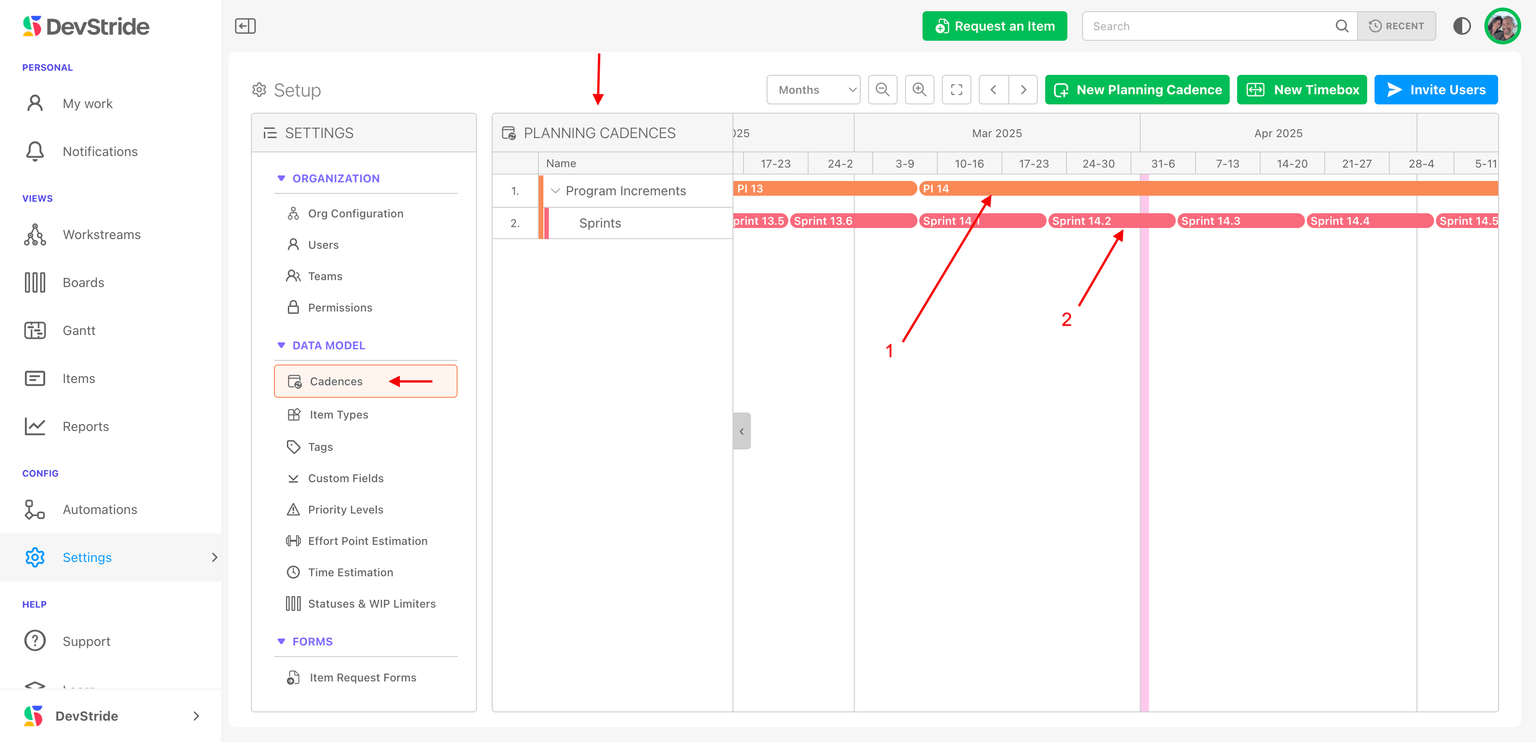
Cadences nest so that planning at different horizons lines up:
- Scaled agile: Program Increment (12 weeks) → Sprint (2 weeks). Six sprints fit a PI, and a Feature committed to PI 3 breaks into Stories committed to Sprints 3.1 to 3.6.
- Calendar planning: Year → Quarter → Month, common for marketing, services, and operations.
A child cadence can name its timeboxes after the parent (Sprint 3.2), so anyone reading a board knows where it sits in the bigger plan.
Deciding what to create
Ask each team how it commits work:
- Two-week sprints inside quarterly planning: a parent cadence every 12 weeks (or 1 quarter) and a child cadence every 2 weeks.
- Monthly: one cadence every 1 month.
- Continuous flow: no cadence; use a perpetual board.
Create one cadence tree per distinct rhythm, and name them so a board owner can tell Engineering Sprint from Marketing Month at a glance. There is no limit on cadences, and different teams can run different ones side by side.
Why it matters downstream
Cadences tie dates to the whole model: items on a cycle inherit its dates (with Sync work item dates with their cycles on), Gantts can snap to cycles, velocity is measured per cycle, and the Cycle Carry Forward report shows what slipped from one to the next. Getting the rhythm right here makes all of that automatic.
Boards: Managing Workflow and Statuses
Step 9 of admin onboarding — why boards come after workstreams and statuses, how to set up your first working-group folder and board, and where the full board documentation lives.
Admin Onboarding - Setting Up Cadences and Timeboxes
Step 10b of admin onboarding — create a planning cadence (label, frequency, label template, parent, colour), nest a child cadence, and generate timeboxes with their dates, including child timeboxes in one go.